
想追踪 Best Buy 的价格?这是个不错的选择,既能帮您掌握优惠信息、发现库存变化,甚至还能用于预测价格趋势。
您有两种方式可选:使用现成工具处理基础需求,或者自建一款专门追踪您关心数据的工具。运动鞋就是一个很好的例子——如果您正在寻找一双日常百搭运动鞋的优惠,价格追踪器能帮您省去手动查看的麻烦。为确保工具持续运行而不被封禁,只需接入代理即可。若需要更精细的指纹控制与会话隔离,反检测浏览器可以更进一步——您可以查看我们整理的反检测浏览器推荐,了解更多选择,接下来我们将介绍具体做法。
什么是 Best Buy 价格追踪器?
所谓Best Buy价格追踪工具,是指监控商品价格,并在出现降价、补货或值得关注的规律变化时及时通知您的工具。
而驱动这一切的,其实是一个按计划加载页面、读取价格、保存数据并定期重复这一过程的抓取程序。
主流 Best Buy 价格追踪工具与应用
还记得我们前面提到的第一种方式吗?使用现成工具处理基础需求。如果您想了解适用于所有电商平台的工具,可以参考我们整理的价格追踪工具推荐。而针对 Best Buy,目前市面上主要有以下几款:
Visualping
让我们先从 Visualping 说起。它提供三种页面追踪方式:您可以让它对指定区域(比如价格区域)截图并逐像素比对;也可以让它抓取原始 HTML 或文本,逐行检测变化;甚至还能通过 CSS 选择器或 XPath 定位具体的 DOM 元素。
对大多数网站来说,这已经足够。但 Best Buy 不一样,它不会只是老老实实返回 HTML 让您随意抓取,其反爬虫机制正是针对这类工具设计的。您可能一开始能顺利检测一两次,随后就会出现延迟、价格消失,页面表面上一切正常,实际上却隐藏了真实数据。而问题在于,Visualping 往往不会察觉自己已被屏蔽。
Hexowatch
Hexowatch 则更进一步,提供 13 种监控类型,涵盖 DOM 元素、视觉快照、关键词触发、完整 HTML 对比、网站地图变化、技术栈变动、在线率监控、API 响应检测、WHOIS 更新乃至外链变化。您可以调整灵敏度、设置扫描计划,更重要的是支持代理轮换,这让它远比基础工具强大得多。
不过它只是对页面变化做出反应,而不是真正适应这些变化。如果 Best Buy 返回虚假价格,或将正确元素隐藏在延迟加载的脚本之后,Hexowatch 仍会记录页面并显示一切正常,不会提示您遗漏了关键信息。这对大多数网站来说已经够用,但面对 Best Buy 还远远不够可靠。
Price Watch for Best Buy(iOS 与 Android)
如果您只是想在手机上随手追踪一两件 Best Buy 商品,这款应用或许就够用了。Price Watch for Best Buy 同时支持iOS与 Android,您只需输入商品链接或使用分享菜单,即可追踪该商品的降价情况。
有用户反馈提醒有时不会触发,而且该应用也不支持代理轮换、内容校验,也无法在 Best Buy 中途更改规则时提示您登录。如果您需要在 Android 设备上追踪价格时管理代理,我们的Android 代理应用可以让您一键切换代理。
PromptCloud
PromptCloud 是一家提供全托管数据服务的供应商,可为您定制 Best Buy 专用爬虫。您只需提供 SKU、所需字段与抓取频率,他们会先给出样例数据供您确认,随后通过 API、CrawlBoard 或 CSV 交付成熟的抓取程序。
如果您只想获得干净的价格数据,而不想自己维护代码、代理或基础设施,这会是不错的选择。您只需告知他们想追踪的 Best Buy 商品价格,他们就会把结果交付给您。
Brandly360
Brandly360 提供一个简洁的控制台,用于追踪 Best Buy、Amazon 等电商平台的价格变化,并通过自动化报告与提醒帮您监控商品页面、横幅促销、库存变动及数字货架展示情况。如果您也想抢购限量硬件,我们的AMD 代理专为抢购 AMD 官方商店的发售商品设计。如果您同时在追踪 Amazon,可以参考我们的Amazon CAPTCHA 绕过指南,了解应对其专属反机器人机制的方法。
不过它价格不菲,套餐起价约为 420 美元/月。对于追求电商数据洞察的大品牌而言,这或许物有所值;但如果您只是想每天追踪几个 Best Buy 价格,或只需要基础提醒而不需要复杂的基础设施,这套方案就显得过于沉重,对轻量级或低频使用场景并不划算。
如何自建 Best Buy 价格追踪器
不妨实话实说:Best Buy 不是一个普通电商网站,您无法仅凭简单的 requests 请求和几个 BeautifulSoup 选择器就完成抓取。
Best Buy 的防御机制十分严格,任何带有自动化特征的行为都会被标记。页面加载过快、跳过步骤,或在 JavaScript 渲染完成前读取内容,都可能导致被封禁。虽然不是每次都会发生,但足以让基础工具失效。
因此,我们会采用不同的构建方式。我们的追踪器首先会执行一次Google 搜索,就像真实用户一样。它会找到正确的 Best Buy 商品页面,在完整浏览器中加载该页面,等待动态内容渲染完成后读取价格。如果价格达到您设定的阈值,就会向您发送提醒。
该系统会轮换代理、切换新的设备指纹,并以更接近真人的方式与页面交互:滚动页面、短暂等待、移动鼠标,像真实购物者一样读取价格。
做得不到位,很快就会失效。接下来我们开始动手。
第一步:前期准备
要让整个流程顺利运行,您需要准备一些工具、权限和基础配置。在正式开始之前,我们先逐一说明所需内容。
安装 Python 3
这个追踪器基于 Python 运行,所以第一步是确认已安装 Python 3。打开终端并执行:
python3 --version
如果看到类似 Python 3.x 的输出,说明一切正常。但如果提示错误,或版本号以 2 开头,请前往python.org下载最新版本,目前最新版本为 Python 3.13.5。
最新版 Google Chrome
这款追踪器使用隐身浏览器模拟真实的 Chrome 会话,它会检测您本地的 Chrome 版本并同步匹配,以避免版本不一致被标记。请确保安装了最新版本的 Chrome,否则可能出现版本冲突并被检测到。
查看 Chrome 版本的方法:
- 打开 Chrome
- 点击右上角的三点图标
- 进入“帮助”
- 点击“关于 Google Chrome”
版本号会直接显示在页面上,这就是我们的隐身驱动程序将要同步的版本。
Undetected-chromedriver
Best Buy 会从浏览器指纹、设备行为、时间特征以及内容加载方式等多个层面进行检测。Undetected-chromedriver正是为应对这类检测而设计,它会改变 Chrome 的启动方式、身份上报方式,以及在被审查时的表现。
- navigator.webdriver
- 浏览器插件列表
- 语言设置
- Canvas 与 WebGL 渲染路径
- Chrome 运行时特征
- 窗口尺寸与缩放比例
- 加载时的 JS 补丁注入
您需要这种程度的隐蔽性,否则 Best Buy 会在您抓取任何数据之前就检测到您的活动。要安装 Chrome Driver,请先在终端中执行以下命令:
pip install undetected-chromedriver
这一步为您装好“大脑”。接下来安装负责执行操作的“双手”,请运行以下命令:
sudo apt install chromium-chromedriver
Selenium
接下来我们需要一个无头浏览器。如果想详细了解它是什么,可以参考我们的指南。Playwright、Puppeteer 与 Selenium 理论上都能用,至少从表面上看,用哪一种都能取得不错的效果。
但 Best Buy 会检查浏览器设置、时间特征、行为模式以及脚本渲染方式,这正是我们选择 Selenium 的原因。Undetected-chromedriver 基于 Selenium 运行,修改的是 Chrome 本身,而不仅仅是会话。Playwright 和 Puppeteer 虽然也能用,但它们的隐身能力依赖插件,这在这里还不够。
执行以下命令安装 Selenium:
pip install selenium
MarsProxies 住宅代理
如果您觉得只用一个 IP 就能蒙混过关,完成所有追踪任务,趁早打消这个念头,因为 Best Buy 的系统就是用来切断重复流量的。如果不轮换 IP,您的脚本迟早会被封禁,只是时间问题。
您需要分布在不同地区的美国住宅代理。这里我们使用 10 个,但如果追踪器需要监控多件商品,建议每件商品至少配置 5 个代理,这样当某个 IP 被临时标记时,您仍有足够的缓冲空间。
Undetected-chromedriver 可以配合代理使用,但用户名密码认证在脚本中运行效果不佳。建议跳过该方式,改为在代理供应商处将您本机的 IP 加入白名单。MarsProxies 让这一步变得很简单,我们已在这篇指南中详细说明。
工具准备就绪,浏览器也已配置到位,接下来就该编写代码了。
第二步:创建脚本文件并设置文件夹
首先打开终端,进入您想存放脚本及其依赖项的目录。这里我们以桌面为例:
cd Desktop
接下来创建一个新文件夹用于存放追踪器:
mkdir Best Buy Price Tracking
进入该文件夹:
cd Best Buy Price Tracking
然后创建 Python 脚本文件:
echo.>Best-Buy-Price-Tracker.py
就是这样。现在用您喜欢的代码编辑器打开该文件,可以开始编写追踪器了。
第三步:导入模块并配置环境
追踪器的每一个环节,都依赖于正确加载相应的工具。
浏览器控制与隐身自动化
这些导入项能帮助您启动 Chrome、模拟用户操作,并应对 Best Buy 抛出的各种检测脚本,是整个隐身方案的基础:
from selenium.webdriver.common.by import By
from selenium.webdriver.common.keys import Keys
from selenium.webdriver.common.action_chains import ActionChains
from selenium.webdriver.support.ui import WebDriverWait
from selenium.webdriver.support import expected_conditions as EC
from selenium.webdriver.chrome.options import Options
from selenium.webdriver.common.desired_capabilities import DesiredCapabilities
import undetected_chromedriver as uc
以下是每个模块的作用:
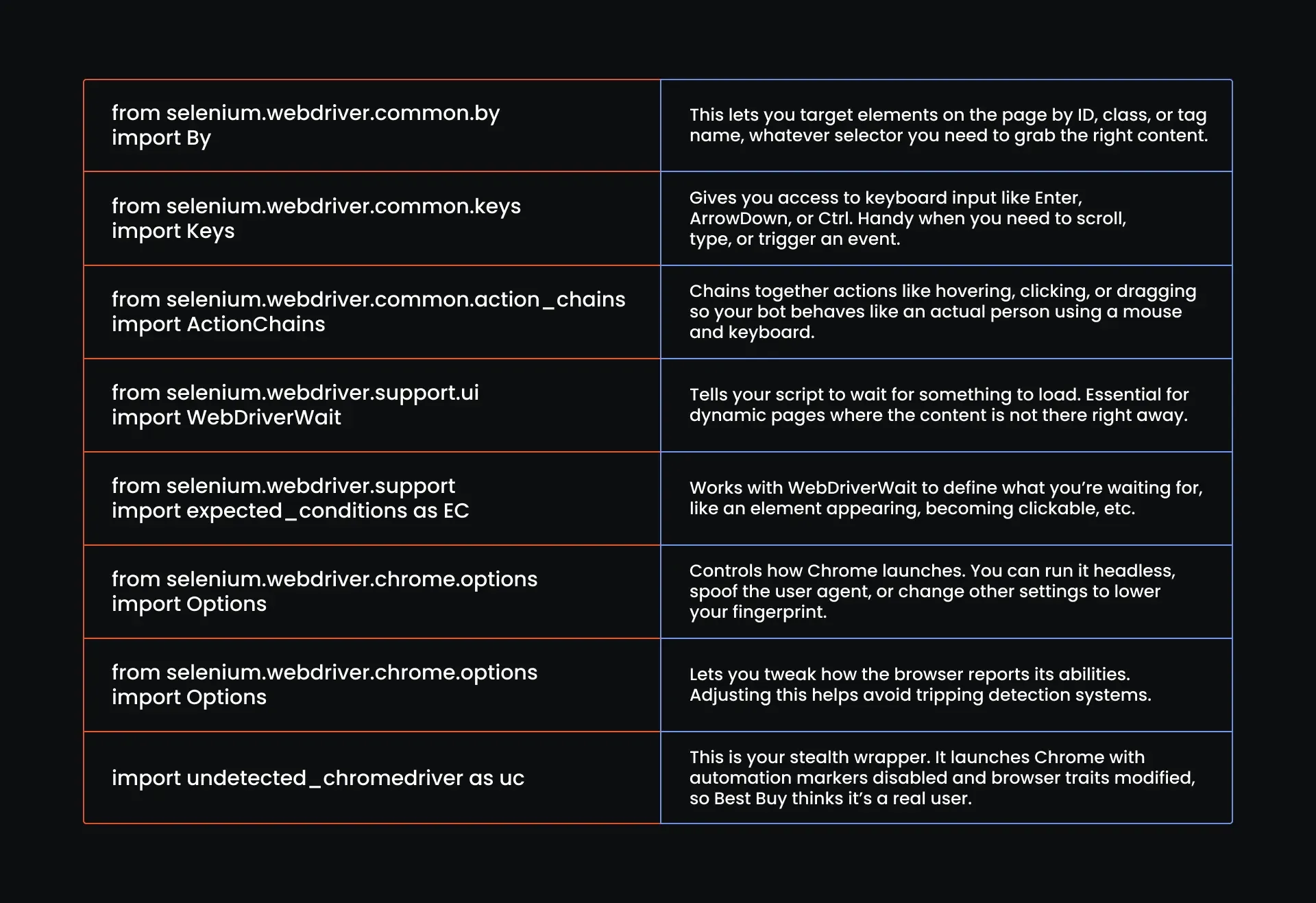
代理、指纹与特征修改逻辑
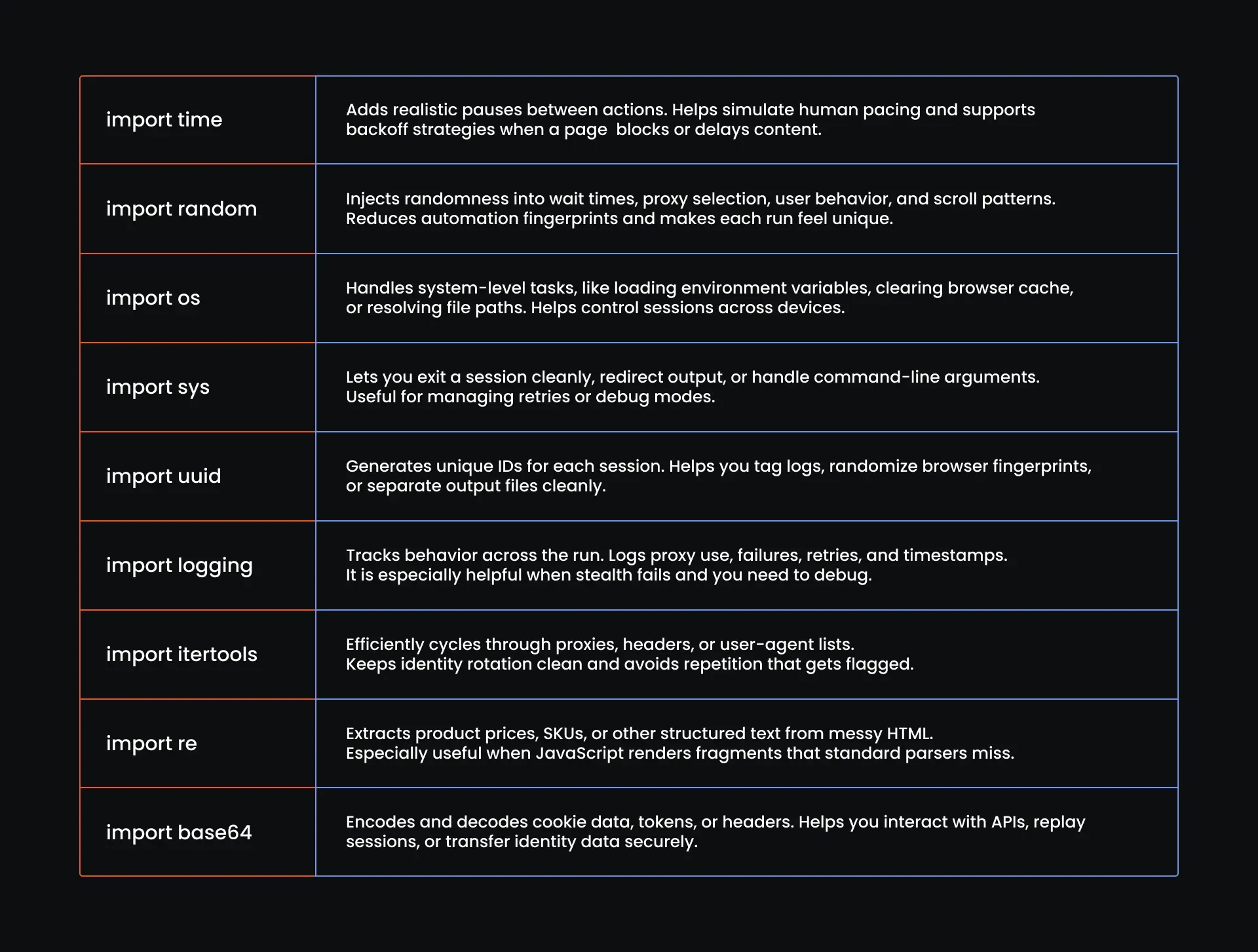
这些导入语句用于轮换代理、改变您的身份特征,并加入延迟使整个过程看起来更自然。这就是为您争取时间的关键所在,有时这就足够了。
以下是您需要用到的导入语句:
import time
import random
import os
import sys
import uuid
import logging
import itertools
import re
import base64
下面逐一说明每个导入语句的作用:
提醒与输出
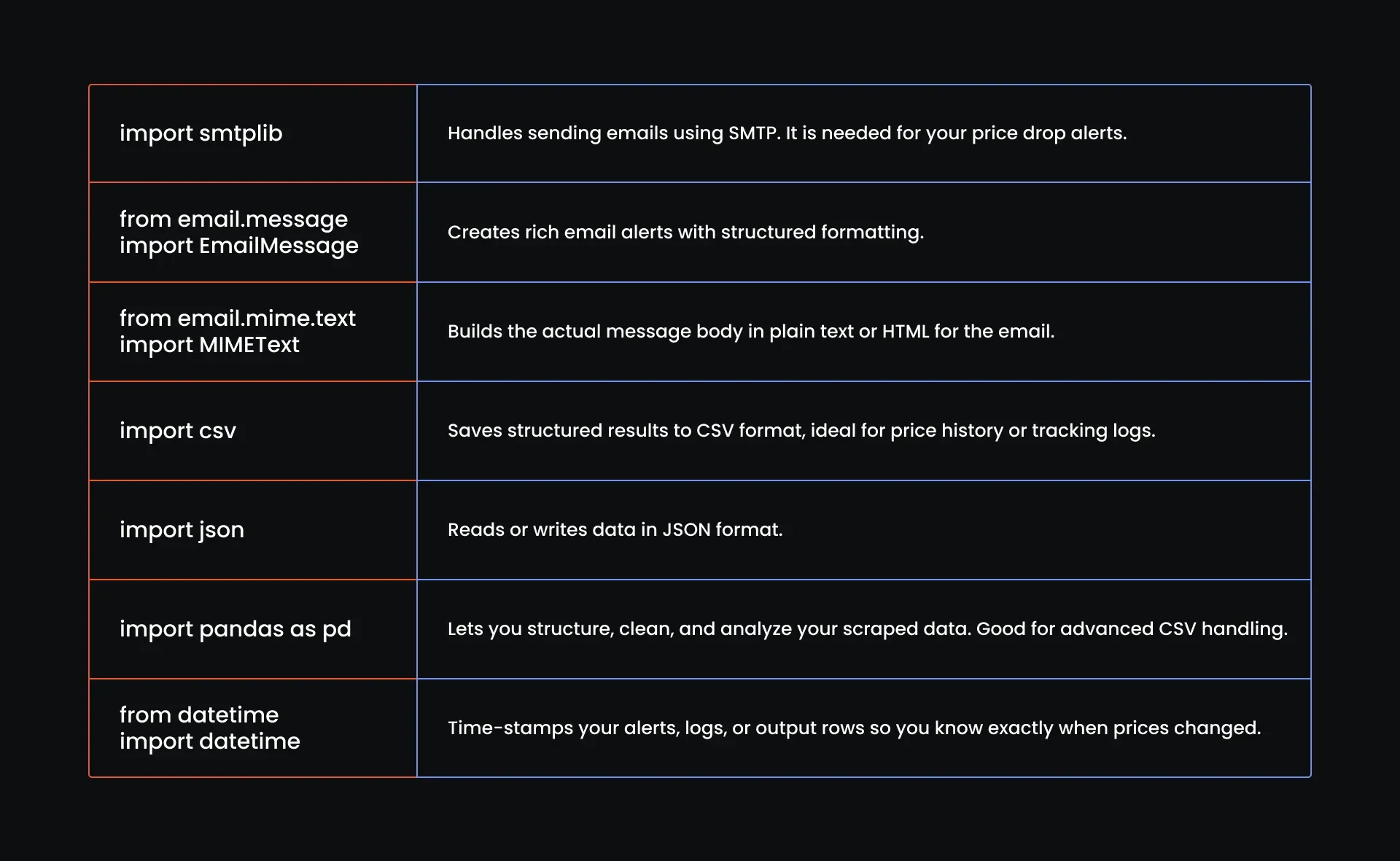
这些导入语句负责最后一步:输出结果。当价格触发条件时发送提醒,记录执行过程,并生成整洁的数据文件,供您后续使用或核查。
import smtplib
from email.message import EmailMessage
from email.mime.text import MIMEText
import csv
import json
import pandas as pd
from datetime import datetime
下面是每个导入语句的作用:
就是这样!第一步到此完成,您的脚本现在应如下所示:
#Browser Control & Stealth Automation
from selenium.webdriver.common.by import By
from selenium.webdriver.common.keys import Keys
from selenium.webdriver.common.action_chains import ActionChains
from selenium.webdriver.support.ui import WebDriverWait
from selenium.webdriver.support import expected_conditions as EC
from selenium.webdriver.chrome.options import Options
from selenium.webdriver.common.desired_capabilities import DesiredCapabilities
import undetected_chromedriver as uc
#Proxy, Fingerprint & Spoofing Logic
import time
import random
import os
import sys
import uuid
import logging
import itertools
import re
import base64
# Alerting & Output
import smtplib
from email.message import EmailMessage
from email.mime.text import MIMEText
import csv
import json
import pandas as pd
from datetime import datetime
第4步:配置全局设置与执行策略
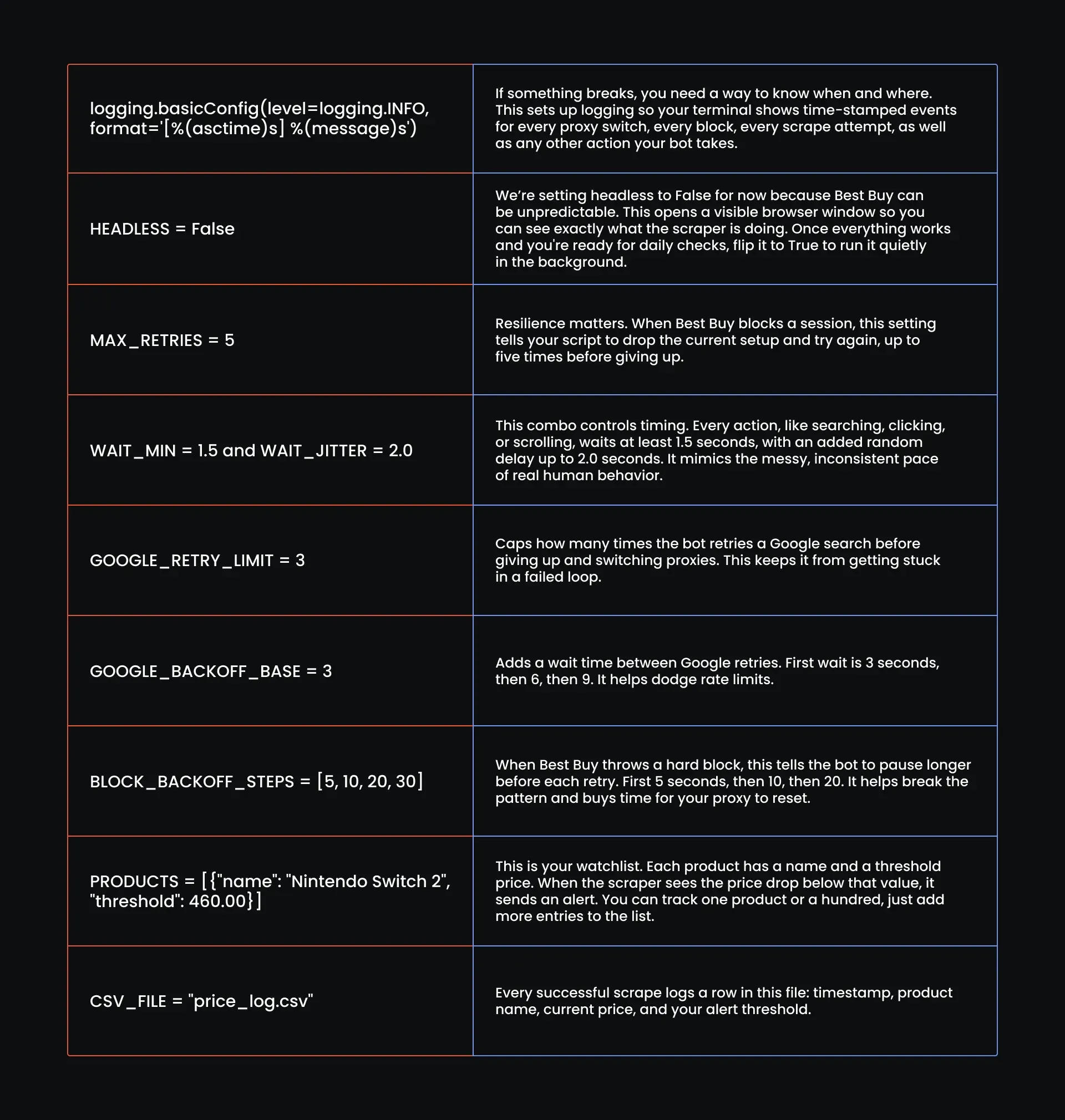
工具都已就绪,接下来该为脚本注入“大脑”了。在这一步,您需要定义脚本的行为方式,包括重试次数、等待时长、要追踪的商品,以及结果记录的位置。
在继续之前,先加入以下全局设置:
# Configure logging
logging.basicConfig(level=logging.INFO, format='[%(asctime)s] %(message)s')
# Global Settings
HEADLESS = False  # Set to True later if you spoof it correctly
MAX_RETRIES = 5
WAIT_MIN = 1.5  # base human wait
WAIT_JITTER = 2.0  # added jitter to simulate inconsistency
GOOGLE_RETRY_LIMIT = 3
GOOGLE_BACKOFF_BASE = 3  # seconds (waits 3s, 6s, 9s...)
BLOCK_BACKOFF_STEPS = [5, 10, 20, 30]  # seconds
# list of products to search
PRODUCTS = [
    {"name": "Nintendo Switch 2", "threshold": 460.00}
]
# CSV Output setup
CSV_FILE = "price_log.csv"
下面逐一说明这些设置的含义:
您的脚本现在应如下所示:
#Browser Control & Stealth Automation
from selenium.webdriver.common.by import By
from selenium.webdriver.common.keys import Keys
from selenium.webdriver.common.action_chains import ActionChains
from selenium.webdriver.support.ui import WebDriverWait
from selenium.webdriver.support import expected_conditions as EC
from selenium.webdriver.chrome.options import Options
from selenium.webdriver.common.desired_capabilities import DesiredCapabilities
import undetected_chromedriver as uc
#Proxy, Fingerprint & Spoofing Logic
import time
import random
import os
import sys
import uuid
import logging
import itertools
import re
import base64
# Alerting & Output
import smtplib
from email.message import EmailMessage
from email.mime.text import MIMEText
import csv
import json
import pandas as pd
from datetime import datetime
# Your global settings and execution strategy
# Configure logging
logging.basicConfig(level=logging.INFO, format='[%(asctime)s] %(message)s')
# Global Settings
HEADLESS = False  # Set to True later if you spoof it correctly
MAX_RETRIES = 5
WAIT_MIN = 1.5  # base human wait
WAIT_JITTER = 2.0  # added jitter to simulate inconsistency
GOOGLE_RETRY_LIMIT = 3
GOOGLE_BACKOFF_BASE = 3  # seconds (waits 3s, 6s, 9s...)
BLOCK_BACKOFF_STEPS = [5, 10, 20, 30]  # seconds
# Example: list of products to search
PRODUCTS = [
    {"name": "Nintendo Switch 2", "threshold": 460.00}
]
# CSV Output setup
CSV_FILE = "price_log.csv"
第5步:配置代理
我们的机器人已经有了导入模块,也有了“大脑”,知道该做什么、何时去做。现在该为它赋予“面孔”了,而这要从代理开始。
添加您的代理字符串
由于我们要重试 5 次,这里加载来自不同州的 10 个美国住宅代理。在这里我们选用 MarsProxies 的住宅代理,因为它速度快、效果好,而且便于管理。
由于 undetected-chromedriver 在代码中处理代理认证较为繁琐,我们干脆跳过用户名密码认证,改用 IP 白名单认证。
在代码中,我们会创建一个列表存放代理,再定义一个函数从中随机选取代理,这样轮换既不可预测又干净利落。由于使用的是 IP 白名单认证而非用户名密码认证,您无需改动代理 URL 的结构,只需更新其中的地理位置和会话部分即可。
请按照以下格式填写:
http://ultra.marsproxies.com:44443/your-proxy-configuration-string
按照这个格式来就没问题,只需替换为正确的州或城市,并调整会话 ID。以下是我们已配置好 10 个真实美国地点的代理列表:
#Proxy Pool
PROXIES = [
    "http://ultra.marsproxies.com:44443/country-us_city-acworth_session-5o10can2_lifetime-20m",
    "http://ultra.marsproxies.com:44443/country-us_state-alabama_session-hk50878d_lifetime-20m",
    "http://ultra.marsproxies.com:44443/country-us_state-arizona_session-0raeiekm_lifetime-20m",
    "http://ultra.marsproxies.com:44443/country-us_city-berea_session-z74rc852_lifetime-20m",
    "http://ultra.marsproxies.com:44443/country-us_city-camden_session-qjx1zf0r_lifetime-20m",
    "http://ultra.marsproxies.com:44443/country-us_city-columbia_session-n81nr351_lifetime-20m",
    "http://ultra.marsproxies.com:44443/country-us_city-daytonabeach_session-iffawas4_lifetime-20m",
    "http://ultra.marsproxies.com:44443/country-us_state-delaware_session-jgvgyrmv_lifetime-20m",
    "http://ultra.marsproxies.com:44443/country-us_city-denver_session-k038l41j_lifetime-20m",
    "http://ultra.marsproxies.com:44443/country-us_city-fairborn_session-edkpbnq6_lifetime-20m"
]
添加时区
即使通过了代理检测,您仍可能露馅。Best Buy 会寻找对不上的信号。比如您使用的是俄亥俄州的美国住宅代理,但浏览器时区却停留在东欧,这就是一个危险信号。Best Buy 察觉到这种矛盾,却不会明说。
此时您得到的只是一次软封锁:页面能加载,但加载出来的只是诱饵,没有价格也没有可用的 DOM,只够营造出“通过”的假象。除非您留心观察,否则根本察觉不到。
为避免这种情况,请在代理列表之后加入以下代码块:
# Minimal city/state to timezone map (expand as needed)
TIMEZONE_MAP = {
    "city-acworth": "America/New_York",
    "city-berea": "America/New_York",
    "city-camden": "America/New_York",
    "city-columbia": "America/New_York",
    "city-daytonabeach": "America/New_York",
    "city-denver": "America/Denver",
    "city-fairborn": "America/New_York",
    "state-alabama": "America/Chicago",
    "state-arizona": "America/Phoenix",
    "state-delaware": "America/New_York"
    # Add more if needed
}
这个字典对应每个代理所在城市或州与其正确时区的关系。字典的键是从代理字符串中提取出的地点,例如“city-denver”或“state-alabama”,值则是相应的时区标识符。
当您的抓取脚本加载某个代理时,会通过这个映射表找到正确的时区,并将其应用到浏览器会话中,从而让 IP 所在位置与浏览器时钟保持一致。
添加函数以提取代理位置并匹配相应时区
代理列表已经准备好,时区映射表也已就位,缺的只是把两者连接起来的环节。请在映射表之后加入以下函数:
def extract_timezone(proxy_string):
    match = re.search(r"(city|state)-([a-z]+)", proxy_string)
    if not match:
        raise ValueError(f"Could not extract location from: {proxy_string}")
    loc_key = f"{match.group(1)}-{match.group(2)}"
    timezone = TIMEZONE_MAP.get(loc_key)
    if not timezone:
        raise ValueError(f"No timezone mapped for: {loc_key}")
    return timezone
这个函数会解析每个代理字符串,提取出其中的位置部分,查找类似 city-denver 或 state-arizona 这样的城市或州标识符。
如果找不到,函数会抛出错误并立即终止。如果找到了,就会据此构建查找键并对照时区映射表进行检查;如果仍然没有匹配,同样会给出提示,告知未找到对应时区。
添加身份池
接下来要添加身份池。毕竟这是 Best Buy,任何细微破绽都逃不过它的眼睛:指纹对不上、时区出错,或是 User-Agent 过时,网站就会停止返回真实数据。
身份池正是用来解决这个问题的,它为您的抓取脚本提供一组干净、可信的设备配置供其轮换使用:
IDENTITY_POOL = [
    {
        "device_group": "desktop-windows",
        "timezone": "America/New_York",
        "user_agent": "Mozilla/5.0 (Windows NT 10.0; Win64; x64) AppleWebKit/537.36 (KHTML, like Gecko) Chrome/121.0.0.0 Safari/537.36",
        "viewport": (1366, 768),
        "platform": "Win32",
        "hardware_concurrency": 8,
        "max_touch_points": 0,
        "webgl_vendor": "Intel Inc.",
        "webgl_renderer": "Intel Iris Xe Graphics"
    },
    {
        "device_group": "desktop-windows",
        "timezone": "America/Chicago",
        "user_agent": "Mozilla/5.0 (Windows NT 10.0; WOW64) AppleWebKit/537.36 (KHTML, like Gecko) Chrome/117.0.5938.92 Safari/537.36",
        "viewport": (1600, 900),
        "platform": "Win32",
        "hardware_concurrency": 4,
        "max_touch_points": 0,
        "webgl_vendor": "NVIDIA Corporation",
        "webgl_renderer": "NVIDIA GeForce GTX 1050/PCIe/SSE2"
    },
    {
        "device_group": "desktop-mac",
        "timezone": "America/Phoenix",
        "user_agent": "Mozilla/5.0 (Macintosh; Intel Mac OS X 13_1) AppleWebKit/605.1.15 (KHTML, like Gecko) Version/16.1 Safari/605.1.15",
        "viewport": (1440, 900),
        "platform": "MacIntel",
        "hardware_concurrency": 8,
        "max_touch_points": 0,
        "webgl_vendor": "Apple Inc.",
        "webgl_renderer": "Apple GPU"
    },
    {
        "device_group": "desktop-linux",
        "timezone": "America/Denver",
        "user_agent": "Mozilla/5.0 (X11; Linux x86_64) AppleWebKit/537.36 (KHTML, like Gecko) Chrome/119.0.0.0 Safari/537.36",
        "viewport": (1280, 720),
        "platform": "Linux x86_64",
        "hardware_concurrency": 4,
        "max_touch_points": 0,
        "webgl_vendor": "X.Org",
        "webgl_renderer": "AMD Radeon RX 560 Series (POLARIS11, DRM 3.35.0, 5.4.0-73-generic)"
    },
    {
        "device_group": "desktop-windows",
        "timezone": "America/New_York",
        "user_agent": "Mozilla/5.0 (Windows NT 6.1; WOW64) AppleWebKit/537.36 (KHTML, like Gecko) Chrome/118.0.5993.88 Safari/537.36",
        "viewport": (1360, 768),
        "platform": "Win32",
        "hardware_concurrency": 2,
        "max_touch_points": 0,
        "webgl_vendor": "Google Inc.",
        "webgl_renderer": "ANGLE (Intel, Intel HD Graphics 4600, Direct3D11 vs_5_0 ps_5_0)"
    },
    {
        "device_group": "desktop-linux",
        "timezone": "America/Chicago",
        "user_agent": "Mozilla/5.0 (X11; Ubuntu; Linux x86_64; rv:109.0) Gecko/20100101 Firefox/119.0",
        "viewport": (1920, 1080),
        "platform": "Linux x86_64",
        "hardware_concurrency": 4,
        "max_touch_points": 0,
        "webgl_vendor": "Mesa/X.org",
        "webgl_renderer": "Mesa DRI Intel(R) HD Graphics 620 (KBL GT2)"
    },
    {
        "device_group": "desktop-mac",
        "timezone": "America/New_York",
        "user_agent": "Mozilla/5.0 (Macintosh; Intel Mac OS X 10_15_7) AppleWebKit/605.1.15 (KHTML, like Gecko) Version/15.1 Safari/605.1.15",
        "viewport": (1280, 800),
        "platform": "MacIntel",
        "hardware_concurrency": 4,
        "max_touch_points": 0,
        "webgl_vendor": "Apple Inc.",
        "webgl_renderer": "AMD Radeon Pro 560X OpenGL Engine"
    },
    {
        "device_group": "desktop-windows",
        "timezone": "America/Phoenix",
        "user_agent": "Mozilla/5.0 (Windows NT 10.0; Win64; x64; rv:118.0) Gecko/20100101 Firefox/118.0",
        "viewport": (1536, 864),
        "platform": "Win32",
        "hardware_concurrency": 8,
        "max_touch_points": 0,
        "webgl_vendor": "Microsoft",
        "webgl_renderer": "Microsoft Basic Render Driver"
    },
    {
        "device_group": "desktop-linux",
        "timezone": "America/Denver",
        "user_agent": "Mozilla/5.0 (X11; Linux x86_64) AppleWebKit/537.36 (KHTML, like Gecko) Chrome/115.0.0.0 Safari/537.36",
        "viewport": (1366, 768),
        "platform": "Linux x86_64",
        "hardware_concurrency": 6,
        "max_touch_points": 0,
        "webgl_vendor": "Google Inc.",
        "webgl_renderer": "ANGLE (AMD, Radeon RX 580 Series Direct3D11 vs_5_0 ps_5_0)"
    },
    {
        "device_group": "desktop-windows",
        "timezone": "America/New_York",
        "user_agent": "Mozilla/5.0 (Windows NT 6.3; Trident/7.0; rv:11.0) like Gecko",
        "viewport": (1024, 768),
        "platform": "Win32",
        "hardware_concurrency": 2,
        "max_touch_points": 0,
        "webgl_vendor": "Microsoft",
        "webgl_renderer": "Direct3D11"
    }
]
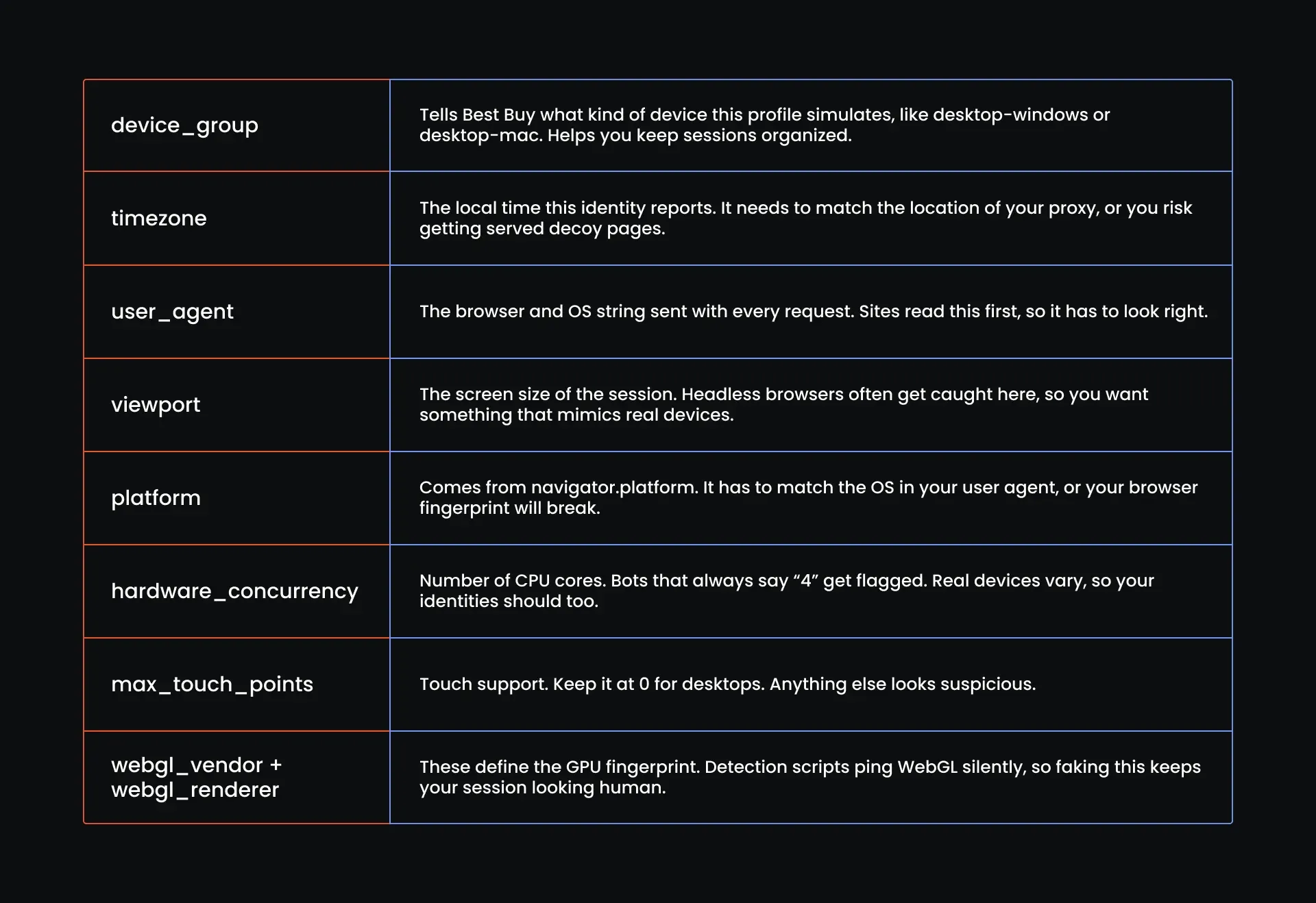
下面是字典列表中每个身份所包含的内容:
添加函数以为每个会话提取代理与身份
此时,您的脚本已经具备了所需的一切:代理、时区,以及覆盖各项基础的身份池。但如果不把它们连接起来,这些都毫无意义。
这个函数负责决定使用哪个代理,获取对应的正确时区,再从身份池中筛选出合理可用的身份。如果没有任何匹配项,它会在浪费任何一次请求之前直接终止运行。
来把它接入脚本:
# Proxy assignment and identity logic
def assign_proxy_and_identity():
    proxy = random.choice(PROXIES)
    logging.info(f"Selected proxy: {proxy}")

    try:
        timezone = extract_timezone(proxy)
    except ValueError as e:
        logging.error(f"Failed to extract timezone: {e}")
        raise
    # Filter identities by matching timezone
    matching_identities = [idn for idn in IDENTITY_POOL if idn["timezone"] == timezone]
       if not matching_identities:
        logging.error(f"No identities found for timezone: {timezone}")
        raise Exception(f"No identities match timezone: {timezone}")
    identity = random.choice(matching_identities)
    logging.info(f"Assigned identity with user agent: {identity['user_agent']}")
    return proxy, identity
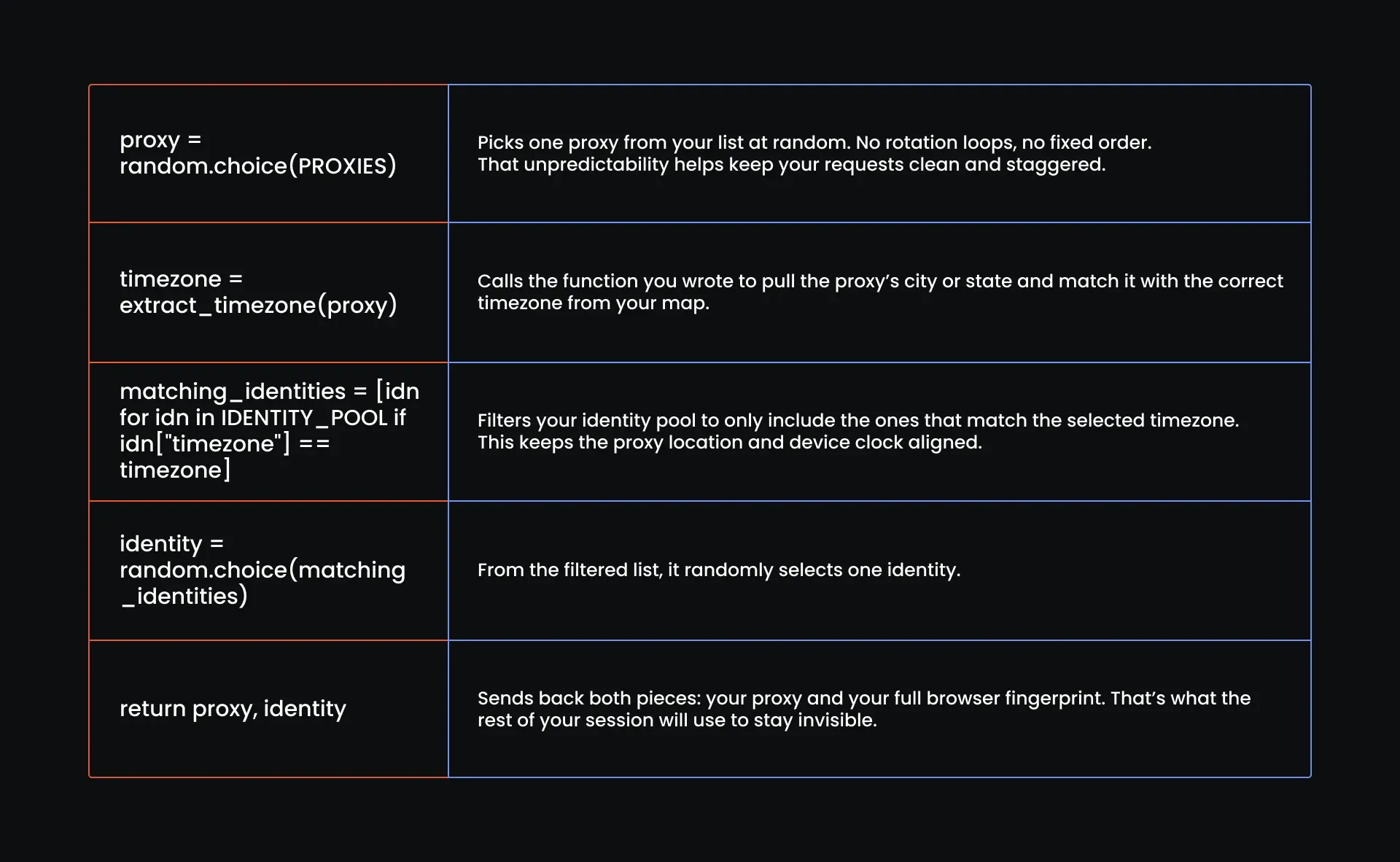
下面详细说明这个函数的具体作用:
第6步:添加行为配置
您的机器人已经伪装得很好,现在该让它表现得更像真人了。这意味着它的动作要更接近真实用户:如果页面刚加载、DOM 还没就绪您就点了下去,Best Buy 立刻就会察觉。
接下来我们要训练行为模式,可以把它看作是机器人的“肌肉记忆”。这些配置为机器人加入恰到好处的停顿与犹豫,让它显得更可信。
将以下代码块加入脚本:
# Each profile defines timing, interaction, and navigation tendencies
BEHAVIOR_PROFILES = [
    {
        "name": "Fast Clicker",
        "base_delay": 0.5,
        "scroll_pattern": "none",
        "hover_before_click": False,
        "re_click_probability": 0.05,
        "slow_typing": False,
        "move_mouse_between_actions": True,
    },
    {
        "name": "Deliberate Reader",
        "base_delay": 2.5,
        "scroll_pattern": "linear",
        "hover_before_click": True,
        "re_click_probability": 0.02,
        "slow_typing": True,
        "move_mouse_between_actions": True,
    },
    {
        "name": "Back-and-Forth Browser",
        "base_delay": 1.2,
        "scroll_pattern": "jittery",
        "hover_before_click": True,
        "re_click_probability": 0.1,
        "slow_typing": True,
        "move_mouse_between_actions": True,
    },
    {
        "name": "Precise Shopper",
        "base_delay": 1.0,
        "scroll_pattern": "none",
        "hover_before_click": False,
        "re_click_probability": 0.01,
        "slow_typing": True,
        "move_mouse_between_actions": True,
    },
    {
        "name": "Researcher",
        "base_delay": 2.0,
        "scroll_pattern": "linear",
        "hover_before_click": True,
        "re_click_probability": 0.03,
        "slow_typing": True,
        "move_mouse_between_actions": True,
    },
    {
        "name": "Curious Clicker",
        "base_delay": 1.7,
        "scroll_pattern": "jittery",
        "hover_before_click": True,
        "re_click_probability": 0.2,
        "slow_typing": False,
        "move_mouse_between_actions": True,
    },
    {
        "name": "Hesitant User",
        "base_delay": 3.0,
        "scroll_pattern": "none",
        "hover_before_click": True,
        "re_click_probability": 0.0,
        "slow_typing": True,
        "move_mouse_between_actions": True,
    },
]
来认识一下这些“角色”:
- Fast Clicker(急速点击者)是那种没耐心的买家,只想赶紧点下“加入购物车”然后走人
- Deliberate Reader(细致阅读者)模拟谨慎的购物者,停留时间更长、滚动页面也更有规律,就像在认真阅读产品参数或评论
- Back-and-Forth Browser(反复浏览者)的表现就像每一步都在犹豫不决
- Precise Shopper(精准购物者)目标明确,不到万不得已绝不滚动页面
- Researcher(研究型用户)事无巨细都要看一遍,滚动平稳、停顿较长,打字速度甚至显得有些过慢
- Curious Clicker(好奇点击者)表现得像个容易分心的用户,偶尔的停顿恰好长到能骗过脚本检测
- Hesitant User(犹豫型用户)动作缓慢,鼠标悬停频繁,滚动少、打字慢,举止间透着生怕点错的小心翼翼,适合用于谨慎型会话
行为配置定义完成后,这个函数会为每个会话随机挑选一种:
# Function to randomly select a behavior profile for a session
def assign_behavior_profile():
    return random.choice(BEHAVIOR_PROFILES)
到这里就完成了,隐身能力已经接入。您的机器人现在无论外表还是行为都更接近真人。此时,您的脚本应如下所示:
#Browser Control & Stealth Automation
from selenium.webdriver.common.by import By
from selenium.webdriver.common.keys import Keys
from selenium.webdriver.common.action_chains import ActionChains
from selenium.webdriver.support.ui import WebDriverWait
from selenium.webdriver.support import expected_conditions as EC
from selenium.webdriver.chrome.options import Options
from selenium.webdriver.common.desired_capabilities import DesiredCapabilities
import undetected_chromedriver as uc
#Proxy, Fingerprint & Spoofing Logic
import time
import random
import os
import sys
import uuid
import logging
import itertools
import re
import base64
# Alerting & Output
import smtplib
from email.message import EmailMessage
from email.mime.text import MIMEText
import csv
import json
import pandas as pd
from datetime import datetime
# Configure logging
logging.basicConfig(level=logging.INFO, format='[%(asctime)s] %(message)s')
# Global Settings
HEADLESS = False  # Set to True later if you spoof it correctly
MAX_RETRIES = 5
WAIT_MIN = 1.5  # base human wait
WAIT_JITTER = 2.0  # added jitter to simulate inconsistency
GOOGLE_RETRY_LIMIT = 3
GOOGLE_BACKOFF_BASE = 3  # seconds (waits 3s, 6s, 9s...)
BLOCK_BACKOFF_STEPS = [5, 10, 20, 30]  # seconds
# Example: list of products to search
PRODUCTS = [
    {"name": "Nintendo Switch 2", "threshold": 460.00}
]
# CSV Output setup
CSV_FILE = "price_log.csv"
#Proxy pool
PROXIES = [
    "http://ultra.marsproxies.com:44443/country-us_city-acworth_session-5o10can2_lifetime-20m",
    "http://ultra.marsproxies.com:44443/country-us_state-alabama_session-hk50878d_lifetime-20m",
    "http://ultra.marsproxies.com:44443/country-us_state-arizona_session-0raeiekm_lifetime-20m",
    "http://ultra.marsproxies.com:44443/country-us_city-berea_session-z74rc852_lifetime-20m",
    "http://ultra.marsproxies.com:44443/country-us_city-camden_session-qjx1zf0r_lifetime-20m",
    "http://ultra.marsproxies.com:44443/country-us_city-columbia_session-n81nr351_lifetime-20m",
    "http://ultra.marsproxies.com:44443/country-us_city-daytonabeach_session-iffawas4_lifetime-20m",
    "http://ultra.marsproxies.com:44443/country-us_state-delaware_session-jgvgyrmv_lifetime-20m",
    "http://ultra.marsproxies.com:44443/country-us_city-denver_session-k038l41j_lifetime-20m",
    "http://ultra.marsproxies.com:44443/country-us_city-fairborn_session-edkpbnq6_lifetime-20m"
]
# Minimal city/state to timezone map (expand as needed)
TIMEZONE_MAP = {
    "city-acworth": "America/New_York",
    "city-berea": "America/New_York",
    "city-camden": "America/New_York",
    "city-columbia": "America/New_York",
    "city-daytonabeach": "America/New_York",
    "city-denver": "America/Denver",
    "city-fairborn": "America/New_York",
    "state-alabama": "America/Chicago",
    "state-arizona": "America/Phoenix",
    "state-delaware": "America/New_York"
    # Add more if needed
}
def extract_timezone(proxy_string):
    match = re.search(r"(city|state)-([a-z]+)", proxy_string)
    if not match:
        raise ValueError(f"Could not extract location from: {proxy_string}")
       loc_key = f"{match.group(1)}-{match.group(2)}"
    timezone = TIMEZONE_MAP.get(loc_key)
        if not timezone:
        raise ValueError(f"No timezone mapped for: {loc_key}")
        return timezone
# Identites to use
IDENTITY_POOL = [
    {
        "device_group": "desktop-windows",
        "timezone": "America/New_York",
        "user_agent": "Mozilla/5.0 (Windows NT 10.0; Win64; x64) AppleWebKit/537.36 (KHTML, like Gecko) Chrome/121.0.0.0 Safari/537.36",
        "viewport": (1366, 768),
        "platform": "Win32",
        "hardware_concurrency": 8,
        "max_touch_points": 0,
        "webgl_vendor": "Intel Inc.",
        "webgl_renderer": "Intel Iris Xe Graphics"
    },
    {
        "device_group": "desktop-windows",
        "timezone": "America/Chicago",
        "user_agent": "Mozilla/5.0 (Windows NT 10.0; WOW64) AppleWebKit/537.36 (KHTML, like Gecko) Chrome/117.0.5938.92 Safari/537.36",
        "viewport": (1600, 900),
        "platform": "Win32",
        "hardware_concurrency": 4,
        "max_touch_points": 0,
        "webgl_vendor": "NVIDIA Corporation",
        "webgl_renderer": "NVIDIA GeForce GTX 1050/PCIe/SSE2"
    },
    {
        "device_group": "desktop-mac",
        "timezone": "America/Phoenix",
        "user_agent": "Mozilla/5.0 (Macintosh; Intel Mac OS X 13_1) AppleWebKit/605.1.15 (KHTML, like Gecko) Version/16.1 Safari/605.1.15",
        "viewport": (1440, 900),
        "platform": "MacIntel",
        "hardware_concurrency": 8,
        "max_touch_points": 0,
        "webgl_vendor": "Apple Inc.",
        "webgl_renderer": "Apple GPU"
    },
    {
        "device_group": "desktop-linux",
        "timezone": "America/Denver",
        "user_agent": "Mozilla/5.0 (X11; Linux x86_64) AppleWebKit/537.36 (KHTML, like Gecko) Chrome/119.0.0.0 Safari/537.36",
        "viewport": (1280, 720),
        "platform": "Linux x86_64",
        "hardware_concurrency": 4,
        "max_touch_points": 0,
        "webgl_vendor": "X.Org",
        "webgl_renderer": "AMD Radeon RX 560 Series (POLARIS11, DRM 3.35.0, 5.4.0-73-generic)"
    },
    {
        "device_group": "desktop-windows",
        "timezone": "America/New_York",
        "user_agent": "Mozilla/5.0 (Windows NT 6.1; WOW64) AppleWebKit/537.36 (KHTML, like Gecko) Chrome/118.0.5993.88 Safari/537.36",
        "viewport": (1360, 768),
        "platform": "Win32",
        "hardware_concurrency": 2,
        "max_touch_points": 0,
        "webgl_vendor": "Google Inc.",
        "webgl_renderer": "ANGLE (Intel, Intel HD Graphics 4600, Direct3D11 vs_5_0 ps_5_0)"
    },
    {
        "device_group": "desktop-linux",
        "timezone": "America/Chicago",
        "user_agent": "Mozilla/5.0 (X11; Ubuntu; Linux x86_64; rv:109.0) Gecko/20100101 Firefox/119.0",
        "viewport": (1920, 1080),
        "platform": "Linux x86_64",
        "hardware_concurrency": 4,
        "max_touch_points": 0,
        "webgl_vendor": "Mesa/X.org",
        "webgl_renderer": "Mesa DRI Intel(R) HD Graphics 620 (KBL GT2)"
    },
    {
        "device_group": "desktop-mac",
        "timezone": "America/New_York",
        "user_agent": "Mozilla/5.0 (Macintosh; Intel Mac OS X 10_15_7) AppleWebKit/605.1.15 (KHTML, like Gecko) Version/15.1 Safari/605.1.15",
        "viewport": (1280, 800),
        "platform": "MacIntel",
        "hardware_concurrency": 4,
        "max_touch_points": 0,
        "webgl_vendor": "Apple Inc.",
        "webgl_renderer": "AMD Radeon Pro 560X OpenGL Engine"
    },
    {
        "device_group": "desktop-windows",
        "timezone": "America/Phoenix",
        "user_agent": "Mozilla/5.0 (Windows NT 10.0; Win64; x64; rv:118.0) Gecko/20100101 Firefox/118.0",
        "viewport": (1536, 864),
        "platform": "Win32",
        "hardware_concurrency": 8,
        "max_touch_points": 0,
        "webgl_vendor": "Microsoft",
        "webgl_renderer": "Microsoft Basic Render Driver"
    },
    {
        "device_group": "desktop-linux",
        "timezone": "America/Denver",
        "user_agent": "Mozilla/5.0 (X11; Linux x86_64) AppleWebKit/537.36 (KHTML, like Gecko) Chrome/115.0.0.0 Safari/537.36",
        "viewport": (1366, 768),
        "platform": "Linux x86_64",
        "hardware_concurrency": 6,
        "max_touch_points": 0,
        "webgl_vendor": "Google Inc.",
        "webgl_renderer": "ANGLE (AMD, Radeon RX 580 Series Direct3D11 vs_5_0 ps_5_0)"
    },
    {
        "device_group": "desktop-windows",
        "timezone": "America/New_York",
        "user_agent": "Mozilla/5.0 (Windows NT 6.3; Trident/7.0; rv:11.0) like Gecko",
        "viewport": (1024, 768),
        "platform": "Win32",
        "hardware_concurrency": 2,
        "max_touch_points": 0,
        "webgl_vendor": "Microsoft",
        "webgl_renderer": "Direct3D11"
    }
]
# Proxy assignment and identity logic
def assign_proxy_and_identity():
    proxy = random.choice(PROXIES)
    logging.info(f"Selected proxy: {proxy}")
    try:
        timezone = extract_timezone(proxy)
    except ValueError as e:
        logging.error(f"Failed to extract timezone: {e}")
        raise
   # Filter identities by matching timezone
    matching_identities = [idn for idn in IDENTITY_POOL if idn["timezone"] == timezone]
    if not matching_identities:
        logging.error(f"No identities found for timezone: {timezone}")
        raise Exception(f"No identities match timezone: {timezone}")
    identity = random.choice(matching_identities)
    logging.info(f"Assigned identity with user agent: {identity['user_agent']}")
    return proxy, identity
# Each profile defines timing, interaction, and navigation tendencies
BEHAVIOR_PROFILES = [
    {
        "name": "Fast Clicker",
        "base_delay": 0.5,
        "scroll_pattern": "none",
        "hover_before_click": False,
        "re_click_probability": 0.05,
        "slow_typing": False,
        "move_mouse_between_actions": True,
    },
    {
        "name": "Deliberate Reader",
        "base_delay": 2.5,
        "scroll_pattern": "linear",
        "hover_before_click": True,
        "re_click_probability": 0.02,
        "slow_typing": True,
        "move_mouse_between_actions": True,
    },
    {
        "name": "Back-and-Forth Browser",
        "base_delay": 1.2,
        "scroll_pattern": "jittery",
        "hover_before_click": True,
        "re_click_probability": 0.1,
        "slow_typing": True,
        "move_mouse_between_actions": True,
    },
    {
        "name": "Precise Shopper",
        "base_delay": 1.0,
        "scroll_pattern": "none",
        "hover_before_click": False,
        "re_click_probability": 0.01,
        "slow_typing": True,
        "move_mouse_between_actions": True,
    },
    {
        "name": "Researcher",
        "base_delay": 2.0,
        "scroll_pattern": "linear",
        "hover_before_click": True,
        "re_click_probability": 0.03,
        "slow_typing": True,
        "move_mouse_between_actions": True,
    },
   {
        "name": "Curious Clicker",
        "base_delay": 1.7,
        "scroll_pattern": "jittery",
        "hover_before_click": True,
        "re_click_probability": 0.2,
        "slow_typing": False,
        "move_mouse_between_actions": True,
    },
    {
        "name": "Hesitant User",
        "base_delay": 3.0,
        "scroll_pattern": "none",
        "hover_before_click": True,
        "re_click_probability": 0.0,
        "slow_typing": True,
        "move_mouse_between_actions": True,
    },
]
# Function to randomly select a behavior profile for a session
def assign_behavior_profile():
    return random.choice(BEHAVIOR_PROFILES)
第7步:启动 undetected-chromedriver
这一步是所有环节的汇合点:代理、时区、指纹与行为逻辑,这个函数将它们全部整合进一个隐身浏览器会话中。请将其加在行为配置函数之后,代码虽长,但每一行都值得保留。
def launch_stealth_browser(proxy: str, identity: dict):
    """
    Launch a stealthy undetected Chrome browser instance with proxy and identity settings applied.
    """
    # Extract proxy credentials and IP
    proxy_address = proxy.split("/")[2]  # Extracts 'ultra.marsproxies.com:44443'
    proxy_address = proxy.split("/")[2]  # Gets host:port from your whitelisted proxy string
    # Stealthy browser options
    options = uc.ChromeOptions()
    options.add_argument(f'--proxy-server=http://{proxy_address}')
    options.add_argument(f"--window-size={identity['viewport'][0]},{identity['viewport'][1]}")
    options.add_argument(f"--lang=en-US,en;q=0.9")
    options.add_argument("--disable-blink-features=AutomationControlled")
    options.add_experimental_option("prefs", {
        "credentials_enable_service": False,
        "profile.password_manager_enabled": False
    })
    if HEADLESS:
        options.add_argument("--headless=new")
    # Start undetected Chrome driver
    driver = uc.Chrome(options=options)
    driver.execute_script("window.localStorage.setItem('bb_test_key', 'value');")
    driver.execute_script("window.sessionStorage.setItem('bb_test_key', 'value');")
    driver.execute_script("document.cookie = 'bb_user_sim=1234567; path=/';")
    driver.execute_cdp_cmd("Page.addScriptToEvaluateOnNewDocument", {
        "source": f"""
            Object.defineProperty(navigator, 'webdriver', {{get: () => undefined}});
            Object.defineProperty(navigator, 'userAgent', {{get: () => "{identity['user_agent']}" }});
            Object.defineProperty(navigator, 'platform', {{get: () => "{identity['platform']}" }});
            Object.defineProperty(navigator, 'hardwareConcurrency', {{get: () => {identity['hardware_concurrency']} }});
            Object.defineProperty(navigator, 'maxTouchPoints', {{get: () => {identity['max_touch_points']} }});
            Object.defineProperty(navigator, 'languages', {{get: () => ['en-US', 'en'] }});
            Object.defineProperty(navigator, 'language', {{get: () => 'en-US' }});
        """
    })
    # Enable DevTools protocol
    driver.execute_cdp_cmd("Page.enable", {})
    # Add fake chrome.runtime support
    driver.execute_cdp_cmd("Runtime.evaluate", {
        "expression": "Object.defineProperty(navigator, 'chrome', { get: () => ({ runtime: {} }) });"
    })
    driver.execute_script("""
        Object.defineProperty(navigator, 'plugins', {
            get: () => [1, 2, 3, 4, 5]
        });
        Object.defineProperty(navigator, 'mimeTypes', {
            get: () => [1, 2, 3]
        });
        navigator.mediaDevices = {
            enumerateDevices: () => Promise.resolve([
                { kind: 'audioinput', label: 'Built-in Microphone' },
                { kind: 'videoinput', label: 'Integrated Camera' }
            ])
        };

        Object.defineProperty(screen, 'colorDepth', {
            get: () => 24
        });
    """)
    # Proxy authentication via DevTools Protocol
    driver.execute_cdp_cmd('Network.enable', {})
    # Set timezone via DevTools
    driver.execute_cdp_cmd("Emulation.setTimezoneOverride", {"timezoneId": identity["timezone"]})
    # Inject WebGL vendor/renderer spoofing if neede
    driver.execute_script("""
        Object.defineProperty(navigator, 'platform', {get: () => '%s'});
        Object.defineProperty(navigator, 'hardwareConcurrency', {get: () => %d});
        Object.defineProperty(navigator, 'maxTouchPoints', {get: () => %d});
        Object.defineProperty(navigator, 'languages', {get: () => ['en-US', 'en']});
        Object.defineProperty(navigator, 'language', {get: () => 'en-US'});
        Object.defineProperty(navigator, 'webdriver', {get: () => undefined});
    """ % (
        identity['platform'],
        identity['hardware_concurrency'],
        identity['max_touch_points']
    ))
    behavior = assign_behavior_profile()
    webgl_vendor = identity['webgl_vendor']
    webgl_renderer = identity['webgl_renderer']
    driver.execute_script(f'''
        const getParameter = WebGLRenderingContext.prototype.getParameter;
        WebGLRenderingContext.prototype.getParameter = function(parameter) {{
            if (parameter === 37445) return "{webgl_vendor}";
            if (parameter === 37446) return "{webgl_renderer}";
            return getParameter(parameter);
        }};
    ''')
    logging.info(f" WebGL spoof applied: {webgl_vendor} / {webgl_renderer}")
    # Canvas fingerprint spoofing and AudioBuffer
    driver.execute_script('''
       const origToDataURL = HTMLCanvasElement.prototype.toDataURL;
       HTMLCanvasElement.prototype.toDataURL = function() {
           return "data:image/png;base64,canvasfakestring==";
        };
        const origGetChannelData = AudioBuffer.prototype.getChannelData;
        AudioBuffer.prototype.getChannelData = function() {
            const results = origGetChannelData.apply(this, arguments);
            for (let i = 0; i < results.length; i++) {
                results[i] = results[i] + Math.random() * 0.0000001;
            }
            return results;
        };
    ''')
    logging.info("Stealth browser launched successfully.")
    return driver, behavior
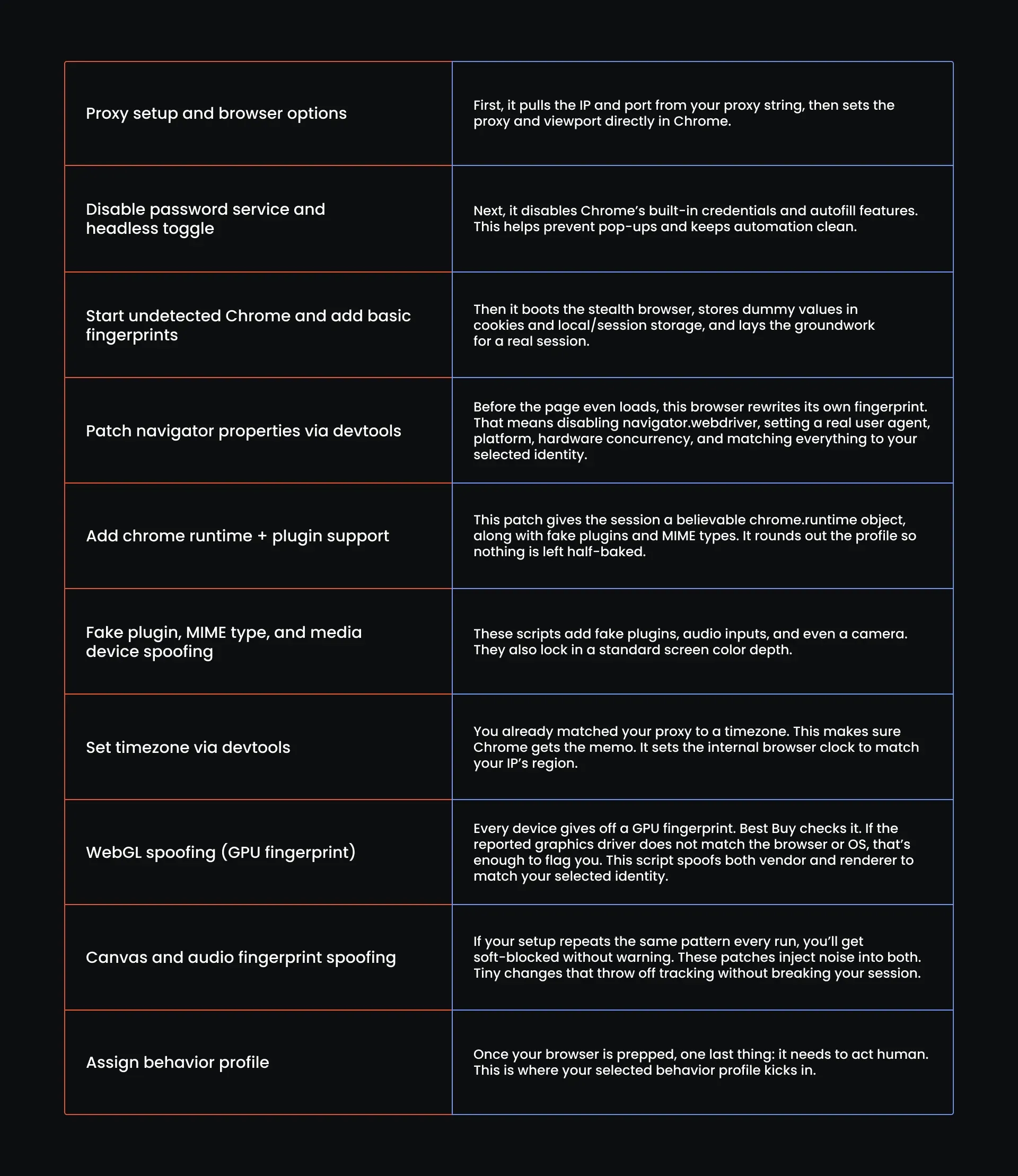
我们逐段拆解来看:
第8步:验证隐身配置是否生效
与其盼着 Best Buy“手下留情”,不如做点更靠谱的事:运行这项快速检测,在访问商品页面之前,它就能告诉您配置是否通过。
def verify_stealth_setup(driver, identity):
    try:
        # Go to a tool that reflects fingerprint info
        driver.get("https://bot.sannysoft.com")
        time.sleep(3)
        # Step 1: Basic navigator checks using JS
        navigator_checks = driver.execute_script("""
            return {
                webdriver: navigator.webdriver === undefined,
                platform: navigator.platform,
                hardwareConcurrency: navigator.hardwareConcurrency,
                languages: navigator.languages,
                userAgent: navigator.userAgent
            };
        """)
        if not navigator_checks['webdriver']:
            logging.warning("webdriver flag detected — browser likely flagged as bot")
            return False
        if navigator_checks['platform'] != identity['platform']:
            logging.warning(f"Platform mismatch: expected {identity['platform']}, got {navigator_checks['platform']}")
            return False
        if navigator_checks['userAgent'] != identity['user_agent']:
            logging.warning(f"User-Agent mismatch: expected {identity['user_agent']}, got {navigator_checks['userAgent']}")
            return False
        # Step 2: Timezone check via JS
        browser_tz = driver.execute_script("return Intl.DateTimeFormat().resolvedOptions().timeZone")
        if browser_tz != identity['timezone']:
            logging.warning(f"Timezone mismatch: expected {identity['timezone']}, got {browser_tz}")
            return False
        # Passed all checks
        logging.info("Stealth verification passed.")
        return True
    except Exception as e:
        logging.error(f"Error during stealth verification: {e}")
        return False
这部分代码就是您的“绊线”,它会在后台加载 Sannysoft,将您的浏览器指纹与真实用户的表现进行比对:通过则可以继续抓取,失败则会告诉您具体哪里出了问题。
它会检查 webdriver 状态、平台、语言栈、CPU 核心数和 User-Agent,再检查时区,所有信息都会与您此前分配的完整浏览器身份指纹逐一比对。一旦出现不匹配,系统就会将其记录下来,会话也会在您接触商品页面之前就此终止。
第9步:定义执行 Google 搜索的函数
一旦身份通过指纹检测,就可以放心往下走了。大多数机器人会直接访问商品链接,这样虽快却并不明智。像真实用户一样从 Google 搜索入手,能让会话更干净、触发的警示更少,虽然只慢了几秒钟,但安全性要高出许多。请将以下代码加在隐身检测之后:
def perform_google_search(driver, behavior, query="nintendo switch 2 best buy"):
    try:
        logging.info("Navigating to Google Search...")
        driver.get("https://www.google.com")
        # Wait for the search input to appear
        search_box = WebDriverWait(driver, 10).until(
            EC.presence_of_element_located((By.NAME, "q"))
        )
        # Simulate human typing with typos and backspaces
        typed = ""
        typo_chance = 0.15 if behavior["slow_typing"] else 0.05
        base_delay = behavior["base_delay"]
        for char in query:
            if random.random() < typo_chance:
                wrong_char = random.choice("abcdefghijklmnopqrstuvwxyz")
                search_box.send_keys(wrong_char)
                time.sleep(base_delay + random.uniform(0, 0.5))
                search_box.send_keys(Keys.BACKSPACE)
                time.sleep(base_delay + random.uniform(0, 0.5))
            search_box.send_keys(char)
            time.sleep(base_delay + random.uniform(0, 0.3))
        search_box.send_keys(Keys.ENTER)
        # Wait for search results to load
        WebDriverWait(driver, 10).until(
            EC.presence_of_element_located((By.ID, "search"))
        )
        time.sleep(base_delay + random.uniform(1.5, 2.5))  # Simulate scanning results
        logging.info("Scanning for Best Buy link...")
        links = driver.find_elements(By.CSS_SELECTOR, 'div#search a')
        for link in links:
            href = link.get_attribute("href")
            if href and "bestbuy.com" in href:
                if behavior["hover_before_click"]:
                    ActionChains(driver).move_to_element(link).perform()
                    time.sleep(base_delay + random.uniform(0.5, 1.0))
                ActionChains(driver).move_to_element(link).pause(random.uniform(0.8, 2)).click().perform()
                logging.info(f" Clicked Best Buy link: {href}")
                 # ADD REFRESH LOGIC HERE
                time.sleep(random.uniform(6, 8))  # Let initial Best Buy page load
                driver.refresh()
                logging.info("Refreshed Best Buy page to trigger JS-based price injection")
                return True
        logging.warning(" No Best Buy link found in search results.")
        return False
    except Exception as e:
        logging.error(f"Error during Google search: {e}")
        return False
这个函数会打开一个全新的 Google 主页,等待搜索框出现后,开始像真人一样输入,期间还会随机出现打字错误和退格修正。每一步都会根据所选的行为配置进行调整。
完整输入查询内容后,它会按下回车键,在搜索结果中查找第一个 Best Buy 链接。找到后便点击进入,等待内容加载,再触发一次整页刷新。这最后一步是为了强制加载那些延迟渲染的元素,比如藏在 JavaScript 背后的价格。
第10步:定义从 Best Buy 提取价格的函数
这里是最终收官之处:这个函数会深入页面提取价格,如果这一步失败,前面做的一切都没有意义。那就让我们写出这个真正让一切落地的函数:
def extract_price_from_bestbuy(driver, behavior):
    try:
        logging.info("Waiting for Best Buy product page to load key elements...")

        # Wait for common layout elements that appear first
        WebDriverWait(driver, 60).until(
            EC.presence_of_element_located((By.CSS_SELECTOR, "header, footer, div.shop-header"))
        )
        time.sleep(random.uniform(5.2, 10.2))
        # Simulate realistic mouse-driven scroll
        for _ in range(5):
            offset = random.randint(200, 600)
            driver.execute_script(f"window.scrollBy(0, {offset});")
            time.sleep(random.uniform(5.2, 10.2))
        # Simulate random user interactions: hover & click on safe visible items
        potential_clicks = driver.find_elements(By.CSS_SELECTOR, "a, button")
        interactive_targets = random.sample(potential_clicks, min(3, len(potential_clicks)))
        # Safe hover only — no clicking
        for el in interactive_targets:
            try:
               if el.is_displayed() and el.is_enabled():
                ActionChains(driver).move_to_element(el).pause(random.uniform(0.6, 1.4)).perform()
                logging.info(f" Hovered on: {el.tag_name}")
                time.sleep(random.uniform(1.0, 2.0))
            except Exception:
                continue
        # Wait for price container
        try:
            WebDriverWait(driver, 60).until(
                EC.visibility_of_element_located((By.CSS_SELECTOR, "div[data-testid='large-customer-price']"))
            )
            logging.info("Price element is now visible.")
        except Exception as e:
            logging.warning(f"Timed out waiting for price to become visible: {e}")
            return None
        # Simulate reading time before extraction
        time.sleep(random.uniform(5.2, 10.2))

        # Smooth hover on the price zone (simulated)
        try:
            price_zone = driver.find_element(By.CSS_SELECTOR, "div[data-testid='large-customer-price']")
            ActionChains(driver).move_to_element(price_zone).pause(random.uniform(0.8, 1.6)).perform()
        except:
            pass  # Continue even if no specific price box
        # Extract price from all possible span elements
        price_elements = driver.find_elements(By.CSS_SELECTOR, "div[data-testid='large-customer-price']")
        for el in price_elements:
            text = el.text.strip()
            if "$" in text and re.search(r"\$\d{2,4}(?:\.\d{2})?", text):
                logging.info(f"Price found: {text}")
                return text
        logging.warning("No matching price span found.")
        return None
    except Exception as e:
        import traceback
        logging.error(f"Price extraction failed: {e}")
        traceback.print_exc()
        # Bonus: capture HTML and screenshot for debug
        timestamp = datetime.now().strftime("%Y%m%d_%H%M%S")
        driver.save_screenshot(f"debug_price_fail_{timestamp}.png")
        with open(f"debug_price_fail_{timestamp}.html", "w", encoding="utf-8") as f:
            f.write(driver.page_source)
        return None
这个函数不做任何假设,而是通过检查页眉、页脚及关键容器,等待页面确实开始加载的可见证据,然后放慢节奏,滚动恰到好处以唤醒懒加载内容,并模拟真实用户那种无意识的、略显散乱的操作。
完成这些后,它会找到可交互元素并将鼠标悬停其上,这些动作会产生可见、可追踪的鼠标行为,留下 Best Buy 能够察觉的轨迹。随后它锁定价格框,像在阅读一样稍作停顿,这才开始提取数据。一旦出现问题,它会暂停、记录错误,然后重新开始。
第11步:添加检测 Best Buy 软封锁的函数
即便做好了隐身、时机控制和干净的请求头,Best Buy 有时仍会偷偷塞进一次伪加载:外表像页面、行为也像页面,却给不出任何有用信息。这正是这个函数存在的意义,它能提前识别这类软封锁,让您的追踪程序知道何时不该相信页面内容。
def detect_block(driver):
    try:
        html = driver.page_source.lower()
        if "unusual traffic" in html or "detected unusual traffic" in html:
            logging.warning("Block detected: Google CAPTCHA page.")
            return "captcha"
        if "are you a human" in html or "please verify you are a human" in html:
            logging.warning("Block detected: Generic bot check.")
            return "bot_check"

        if "automated queries" in html or "too many requests" in html:
            logging.warning("Block detected: Rate limit or abuse prevention.")
            return "rate_limit"
        if "access denied" in html or "403 forbidden" in html:
            logging.warning("Block detected: Forbidden page.")
            return "forbidden"
        if len(html.strip()) < 1000:
            logging.warning("Block suspected: Empty or tiny page.")
            return "empty"
        return None
这个函数会寻找页面并非真实加载的信号,检查 DOM 中是否存在 CAPTCHA,扫描诸如“access denied”或“please wait”之类的通用错误信息,并判断主价格容器是否消失。这些都是破绽,往往出现在网站怀疑您是机器人、却又不想明说的时候。
一旦这个函数发现其中任何一个信号,就会判定数据已不可信,并提前终止会话,从而避免记录无效数据、白白浪费代理轮换,或是对虚假降价发出提醒。
第12步:添加提取价格、发送邮件提醒及记录到 CSV 的函数
我们会添加一个函数用于获取价格,再添加一个函数直接向您的邮箱发送提醒,第三个函数则负责把数据记录到 CSV 文件中以便长期追踪。
def clean_price_string(price_str):
    match = re.search(r"\$(\d{2,5}(?:\.\d{2})?)", price_str)
    return float(match.group(1)) if match else None
def send_price_alert(product_name, price, threshold):
    msg = MIMEText(f" Price Drop Alert \n\n{product_name} has dropped to ${price:.2f} — below your threshold of ${threshold:.2f}.\nTime to buy!")
    msg["Subject"] = f"Time to Buy: {product_name} is now ${price:.2f}"
    msg["From"] = "youremailaddress"
    msg["To"] = "youremailaddress"
    with smtplib.SMTP("smtp.gmail.com", 587) as server:
        server.starttls()
        server.login("oyouremailadress", "yourpassword")
        server.send_message(msg)
def log_price_to_csv(product_name, price, threshold):
    with open("price_alerts.csv", mode="a", newline="", encoding="utf-8") as f:
        writer = csv.writer(f)
        writer.writerow([datetime.now().isoformat(), product_name, price, threshold])
第13步:编写主函数
所有工具均已准备就绪,现在编写运行整体流程的代码部分。主函数负责启动所有环节:浏览器、行为模拟、搜索、数据提取和提醒通知,运行方式如下:
for attempt in range(MAX_RETRIES):
    try:
        query = "nintendo switch 2 best buy"
        proxy, identity = assign_proxy_and_identity()
        driver, behavior = launch_stealth_browser(proxy, identity)
        logging.info(f"Behavior profile: {behavior['name']}")
        if not verify_stealth_setup(driver, identity):
            raise Exception("Stealth verification failed.")
        for google_attempt in range(1, GOOGLE_RETRY_LIMIT + 1):
            logging.info(f"Google search attempt {google_attempt}")
            success = perform_google_search(driver, behavior, query=query)
            if detect_block(driver):
                raise Exception("Blocked during Google search.")
            if success:
                logging.info("Google search succeeded.")
                price = extract_price_from_bestbuy(driver, behavior)
                if detect_block(driver):
                    raise Exception("Blocked during Best Buy visit.")
                cleaned_price = clean_price_string(price)
                if cleaned_price:
                    logging.info(f" Parsed price: {cleaned_price:.2f}")
                    for product in PRODUCTS:
                        if product["name"].lower() in query.lower():  # crude match
                            if cleaned_price <= product["threshold"]:
                                logging.info(f" {product['name']} is below threshold of ${product['threshold']:.2f}")
                                send_price_alert(product["name"], cleaned_price, product["threshold"])
                                log_price_to_csv(product["name"], cleaned_price, product["threshold"])
                                driver.quit()      #  Clean exit
                                sys.exit(0)        #  Hard exit after success
                            else:
                                logging.info(f" Price is above threshold — no alert needed.")
                else:
                    logging.warning("Failed to parse price as float.")
                    break
            else:
                logging.warning("Google search failed. Retrying...")
                time.sleep(GOOGLE_BACKOFF_BASE * google_attempt)
        else:
            raise Exception("All Google search retries failed.")
        driver.quit()
        break  # All good
    except Exception as e:
        logging.error(f"Attempt failed due to: {e}")
        backoff = BLOCK_BACKOFF_STEPS[min(attempt, len(BLOCK_BACKOFF_STEPS) - 1)]
        logging.info(f"Waiting {backoff}s before trying new proxy + identity.")
        try:
            driver.quit()
        except:
            pass
        time.sleep(backoff)
else:
    logging.critical("All attempts failed. Exiting.")
    sys.exit(1)
这是主循环,负责执行完整的追踪流程:代理轮换、身份伪装、指纹检测、页面数据抓取、提醒通知和日志记录。
首先定义产品搜索查询,然后通过 assign_proxy_and_identity() 获取新的代理和匹配的身份信息,并使用 launch_stealth_browser() 启动隐身浏览器。这两个函数此前已定义,确保每个会话看起来都像是来自与代理相同时区的真实用户。
浏览器启动后,脚本调用 verify_stealth_setup() 确认该会话通过所有指纹检测。确认无误后,使用 perform_google_search() 在 Google 上执行搜索,再通过 detect_block() 检测是否存在软封锁。
进入 Best Buy 页面后,脚本执行 extract_price_from_bestbuy() 获取当前价格,再用 clean_price_string() 进行清洗,并与产品列表中设置的价格阈值进行比较。
若价格低于阈值,脚本会触发 send_price_alert() 发送提醒,并使用 log_price_to_csv() 记录数据。若过程中出现任何异常,会话将被清理,系统重新获取新的配置并再次尝试。
第 14 步:运行追踪脚本
以下是适用于 Best Buy 的完整可运行价格追踪脚本:
# Your Import statements
import re
import base64
import pandas as pd
from selenium.webdriver.common.by import By
from selenium.webdriver.common.keys import Keys
from selenium.webdriver.common.action_chains import ActionChains
from selenium.webdriver.support.ui import WebDriverWait
from selenium.webdriver.support import expected_conditions as EC
from selenium.webdriver.chrome.options import Options
from selenium.webdriver.common.desired_capabilities import DesiredCapabilities
import undetected_chromedriver as uc
import smtplib
from email.message import EmailMessage
from email.mime.text import MIMEText
import time
import random
import os
import sys
import csv
import json
from datetime import datetime
import itertools
import uuid
import logging
# Configure logging
logging.basicConfig(level=logging.INFO, format='[%(asctime)s] %(message)s')
# Global Settings
HEADLESS = False  # Set to True later if you spoof it correctly
MAX_RETRIES = 5
WAIT_MIN = 1.5  # base human wait
WAIT_JITTER = 2.0  # added jitter to simulate inconsistency
GOOGLE_RETRY_LIMIT = 3
GOOGLE_BACKOFF_BASE = 3  # seconds (waits 3s, 6s, 9s...)
BLOCK_BACKOFF_STEPS = [5, 10, 20, 30]  # seconds
# Example: list of products to search
PRODUCTS = [
    {"name": "Nintendo Switch 2", "threshold": 460.00}
]
# CSV Output setup
CSV_FILE = "price_log.csv"
#Proxy pool
PROXIES = [
    "http://ultra.marsproxies.com:44443/country-us_city-acworth_session-5o10can2_lifetime-20m",
    "http://ultra.marsproxies.com:44443/country-us_state-alabama_session-hk50878d_lifetime-20m",
    "http://ultra.marsproxies.com:44443/country-us_state-arizona_session-0raeiekm_lifetime-20m",
    "http://ultra.marsproxies.com:44443/country-us_city-berea_session-z74rc852_lifetime-20m",
    "http://ultra.marsproxies.com:44443/country-us_city-camden_session-qjx1zf0r_lifetime-20m",
    "http://ultra.marsproxies.com:44443/country-us_city-columbia_session-n81nr351_lifetime-20m",
    "http://ultra.marsproxies.com:44443/country-us_city-daytonabeach_session-iffawas4_lifetime-20m",
    "http://ultra.marsproxies.com:44443/country-us_state-delaware_session-jgvgyrmv_lifetime-20m",
    "http://ultra.marsproxies.com:44443/country-us_city-denver_session-k038l41j_lifetime-20m",
    "http://ultra.marsproxies.com:44443/country-us_city-fairborn_session-edkpbnq6_lifetime-20m"
]
# Minimal city/state to timezone map (expand as needed)
TIMEZONE_MAP = {
    "city-acworth": "America/New_York",
    "city-berea": "America/New_York",
    "city-camden": "America/New_York",
    "city-columbia": "America/New_York",
    "city-daytonabeach": "America/New_York",
    "city-denver": "America/Denver",
    "city-fairborn": "America/New_York",
    "state-alabama": "America/Chicago",
    "state-arizona": "America/Phoenix",
    "state-delaware": "America/New_York"
    # Add more if needed
}

def extract_timezone(proxy_string):
    match = re.search(r"(city|state)-([a-z]+)", proxy_string)
    if not match:
        raise ValueError(f"Could not extract location from: {proxy_string}")

    loc_key = f"{match.group(1)}-{match.group(2)}"
    timezone = TIMEZONE_MAP.get(loc_key)
        if not timezone:
        raise ValueError(f"No timezone mapped for: {loc_key}")
       return timezone
# Identites to use
IDENTITY_POOL = [
    {
        "device_group": "desktop-windows",
        "timezone": "America/New_York",
        "user_agent": "Mozilla/5.0 (Windows NT 10.0; Win64; x64) AppleWebKit/537.36 (KHTML, like Gecko) Chrome/121.0.0.0 Safari/537.36",
        "viewport": (1366, 768),
        "platform": "Win32",
        "hardware_concurrency": 8,
        "max_touch_points": 0,
        "webgl_vendor": "Intel Inc.",
        "webgl_renderer": "Intel Iris Xe Graphics"
    },
    {
        "device_group": "desktop-windows",
        "timezone": "America/Chicago",
        "user_agent": "Mozilla/5.0 (Windows NT 10.0; WOW64) AppleWebKit/537.36 (KHTML, like Gecko) Chrome/117.0.5938.92 Safari/537.36",
        "viewport": (1600, 900),
        "platform": "Win32",
        "hardware_concurrency": 4,
        "max_touch_points": 0,
        "webgl_vendor": "NVIDIA Corporation",
        "webgl_renderer": "NVIDIA GeForce GTX 1050/PCIe/SSE2"
    },
    {
        "device_group": "desktop-mac",
        "timezone": "America/Phoenix",
        "user_agent": "Mozilla/5.0 (Macintosh; Intel Mac OS X 13_1) AppleWebKit/605.1.15 (KHTML, like Gecko) Version/16.1 Safari/605.1.15",
        "viewport": (1440, 900),
        "platform": "MacIntel",
        "hardware_concurrency": 8,
        "max_touch_points": 0,
        "webgl_vendor": "Apple Inc.",
        "webgl_renderer": "Apple GPU"
    },
    {
        "device_group": "desktop-linux",
        "timezone": "America/Denver",
        "user_agent": "Mozilla/5.0 (X11; Linux x86_64) AppleWebKit/537.36 (KHTML, like Gecko) Chrome/119.0.0.0 Safari/537.36",
        "viewport": (1280, 720),
        "platform": "Linux x86_64",
        "hardware_concurrency": 4,
        "max_touch_points": 0,
        "webgl_vendor": "X.Org",
        "webgl_renderer": "AMD Radeon RX 560 Series (POLARIS11, DRM 3.35.0, 5.4.0-73-generic)"
    },
    {
        "device_group": "desktop-windows",
        "timezone": "America/New_York",
        "user_agent": "Mozilla/5.0 (Windows NT 6.1; WOW64) AppleWebKit/537.36 (KHTML, like Gecko) Chrome/118.0.5993.88 Safari/537.36",
        "viewport": (1360, 768),
        "platform": "Win32",
        "hardware_concurrency": 2,
        "max_touch_points": 0,
        "webgl_vendor": "Google Inc.",
        "webgl_renderer": "ANGLE (Intel, Intel HD Graphics 4600, Direct3D11 vs_5_0 ps_5_0)"
    },
    {
        "device_group": "desktop-linux",
        "timezone": "America/Chicago",
        "user_agent": "Mozilla/5.0 (X11; Ubuntu; Linux x86_64; rv:109.0) Gecko/20100101 Firefox/119.0",
        "viewport": (1920, 1080),
        "platform": "Linux x86_64",
        "hardware_concurrency": 4,
        "max_touch_points": 0,
        "webgl_vendor": "Mesa/X.org",
        "webgl_renderer": "Mesa DRI Intel(R) HD Graphics 620 (KBL GT2)"
    },
    {
        "device_group": "desktop-mac",
        "timezone": "America/New_York",
        "user_agent": "Mozilla/5.0 (Macintosh; Intel Mac OS X 10_15_7) AppleWebKit/605.1.15 (KHTML, like Gecko) Version/15.1 Safari/605.1.15",
        "viewport": (1280, 800),
        "platform": "MacIntel",
        "hardware_concurrency": 4,
        "max_touch_points": 0,
        "webgl_vendor": "Apple Inc.",
        "webgl_renderer": "AMD Radeon Pro 560X OpenGL Engine"
    },
    {
        "device_group": "desktop-windows",
        "timezone": "America/Phoenix",
        "user_agent": "Mozilla/5.0 (Windows NT 10.0; Win64; x64; rv:118.0) Gecko/20100101 Firefox/118.0",
        "viewport": (1536, 864),
        "platform": "Win32",
        "hardware_concurrency": 8,
        "max_touch_points": 0,
        "webgl_vendor": "Microsoft",
        "webgl_renderer": "Microsoft Basic Render Driver"
    },
    {
        "device_group": "desktop-linux",
        "timezone": "America/Denver",
        "user_agent": "Mozilla/5.0 (X11; Linux x86_64) AppleWebKit/537.36 (KHTML, like Gecko) Chrome/115.0.0.0 Safari/537.36",
        "viewport": (1366, 768),
        "platform": "Linux x86_64",
        "hardware_concurrency": 6,
        "max_touch_points": 0,
        "webgl_vendor": "Google Inc.",
        "webgl_renderer": "ANGLE (AMD, Radeon RX 580 Series Direct3D11 vs_5_0 ps_5_0)"
    },
    {
        "device_group": "desktop-windows",
        "timezone": "America/New_York",
        "user_agent": "Mozilla/5.0 (Windows NT 6.3; Trident/7.0; rv:11.0) like Gecko",
        "viewport": (1024, 768),
        "platform": "Win32",
        "hardware_concurrency": 2,
        "max_touch_points": 0,
        "webgl_vendor": "Microsoft",
        "webgl_renderer": "Direct3D11"
    }
]
# Proxy assignment and identity logic
def assign_proxy_and_identity():
    proxy = random.choice(PROXIES)
    logging.info(f"Selected proxy: {proxy}")
    try:
        timezone = extract_timezone(proxy)
    except ValueError as e:
        logging.error(f"Failed to extract timezone: {e}")
        raise
    # Filter identities by matching timezone
    matching_identities = [idn for idn in IDENTITY_POOL if idn["timezone"] == timezone]
      if not matching_identities:
        logging.error(f"No identities found for timezone: {timezone}")
        raise Exception(f"No identities match timezone: {timezone}")
    identity = random.choice(matching_identities)
    logging.info(f"Assigned identity with user agent: {identity['user_agent']}")
    return proxy, identity
# Each profile defines timing, interaction, and navigation tendencies
BEHAVIOR_PROFILES = [
    {
        "name": "Fast Clicker",
        "base_delay": 0.5,
        "scroll_pattern": "none",
        "hover_before_click": False,
        "re_click_probability": 0.05,
        "slow_typing": False,
        "move_mouse_between_actions": True,
    },
    {
        "name": "Deliberate Reader",
        "base_delay": 2.5,
        "scroll_pattern": "linear",
        "hover_before_click": True,
        "re_click_probability": 0.02,
        "slow_typing": True,
        "move_mouse_between_actions": True,
    },
    {
        "name": "Back-and-Forth Browser",
        "base_delay": 1.2,
        "scroll_pattern": "jittery",
        "hover_before_click": True,
        "re_click_probability": 0.1,
        "slow_typing": True,
        "move_mouse_between_actions": True,
    },
    {
        "name": "Precise Shopper",
        "base_delay": 1.0,
        "scroll_pattern": "none",
        "hover_before_click": False,
        "re_click_probability": 0.01,
        "slow_typing": True,
        "move_mouse_between_actions": True,
    },
    {
        "name": "Researcher",
        "base_delay": 2.0,
        "scroll_pattern": "linear",
        "hover_before_click": True,
        "re_click_probability": 0.03,
        "slow_typing": True,
        "move_mouse_between_actions": True,
    },
    {
        "name": "Curious Clicker",
        "base_delay": 1.7,
        "scroll_pattern": "jittery",
        "hover_before_click": True,
        "re_click_probability": 0.2,
        "slow_typing": False,
        "move_mouse_between_actions": True,
    },
    {
        "name": "Hesitant User",
        "base_delay": 3.0,
        "scroll_pattern": "none",
        "hover_before_click": True,
        "re_click_probability": 0.0,
        "slow_typing": True,
        "move_mouse_between_actions": True,
    },
]
# Function to randomly select a behavior profile for a session
def assign_behavior_profile():
    return random.choice(BEHAVIOR_PROFILES)

# Here's the complete stealth launch function based on the provided context.
def launch_stealth_browser(proxy: str, identity: dict):
    """
    Launch a stealthy undetected Chrome browser instance with proxy and identity settings applied.
    """

    # Extract proxy credentials and IP
    proxy_address = proxy.split("/")[2]  # Extracts 'ultra.marsproxies.com:44443'
    proxy_address = proxy.split("/")[2]  # Gets host:port from your whitelisted proxy string
    # Stealthy browser options
    options = uc.ChromeOptions()
    options.add_argument(f'--proxy-server=http://{proxy_address}')
    options.add_argument(f"--window-size={identity['viewport'][0]},{identity['viewport'][1]}")
    options.add_argument(f"--lang=en-US,en;q=0.9")
    options.add_argument("--disable-blink-features=AutomationControlled")
    options.add_experimental_option("prefs", {
        "credentials_enable_service": False,
        "profile.password_manager_enabled": False
    })
    if HEADLESS:
        options.add_argument("--headless=new")
    # Start undetected Chrome driver
    driver = uc.Chrome(options=options)
    driver.execute_script("window.localStorage.setItem('bb_test_key', 'value');")
    driver.execute_script("window.sessionStorage.setItem('bb_test_key', 'value');")
    driver.execute_script("document.cookie = 'bb_user_sim=1234567; path=/';")
    driver.execute_cdp_cmd("Page.addScriptToEvaluateOnNewDocument", {
        "source": f"""
            Object.defineProperty(navigator, 'webdriver', {{get: () => undefined}});
            Object.defineProperty(navigator, 'userAgent', {{get: () => "{identity['user_agent']}" }});
            Object.defineProperty(navigator, 'platform', {{get: () => "{identity['platform']}" }});
            Object.defineProperty(navigator, 'hardwareConcurrency', {{get: () => {identity['hardware_concurrency']} }});
            Object.defineProperty(navigator, 'maxTouchPoints', {{get: () => {identity['max_touch_points']} }});
            Object.defineProperty(navigator, 'languages', {{get: () => ['en-US', 'en'] }});
            Object.defineProperty(navigator, 'language', {{get: () => 'en-US' }});
        """
    })
    # Enable DevTools protocol
    driver.execute_cdp_cmd("Page.enable", {})
    # Add fake chrome.runtime support
    driver.execute_cdp_cmd("Runtime.evaluate", {
        "expression": "Object.defineProperty(navigator, 'chrome', { get: () => ({ runtime: {} }) });"
    })
    driver.execute_script("""
        Object.defineProperty(navigator, 'plugins', {
            get: () => [1, 2, 3, 4, 5]
        });
        Object.defineProperty(navigator, 'mimeTypes', {
            get: () => [1, 2, 3]
        });
        navigator.mediaDevices = {
            enumerateDevices: () => Promise.resolve([
                { kind: 'audioinput', label: 'Built-in Microphone' },
                { kind: 'videoinput', label: 'Integrated Camera' }
            ])
        };
        Object.defineProperty(screen, 'colorDepth', {
            get: () => 24
        });
    """)
    # Proxy authentication via DevTools Protocol
    driver.execute_cdp_cmd('Network.enable', {})
    # Set timezone via DevTools
    driver.execute_cdp_cmd("Emulation.setTimezoneOverride", {"timezoneId": identity["timezone"]})
    # Inject WebGL vendor/renderer spoofing if neede
    driver.execute_script("""
        Object.defineProperty(navigator, 'platform', {get: () => '%s'});
        Object.defineProperty(navigator, 'hardwareConcurrency', {get: () => %d});
        Object.defineProperty(navigator, 'maxTouchPoints', {get: () => %d});
        Object.defineProperty(navigator, 'languages', {get: () => ['en-US', 'en']});
        Object.defineProperty(navigator, 'language', {get: () => 'en-US'});
        Object.defineProperty(navigator, 'webdriver', {get: () => undefined});
    """ % (
        identity['platform'],
        identity['hardware_concurrency'],
        identity['max_touch_points']
    ))
    behavior = assign_behavior_profile()
    webgl_vendor = identity['webgl_vendor']
    webgl_renderer = identity['webgl_renderer']
    driver.execute_script(f'''
        const getParameter = WebGLRenderingContext.prototype.getParameter;
        WebGLRenderingContext.prototype.getParameter = function(parameter) {{
            if (parameter === 37445) return "{webgl_vendor}";
            if (parameter === 37446) return "{webgl_renderer}";
            return getParameter(parameter);
        }};
    ''')
    logging.info(f" WebGL spoof applied: {webgl_vendor} / {webgl_renderer}")
    # Canvas fingerprint spoofing and AudioBuffer
    driver.execute_script('''
       const origToDataURL = HTMLCanvasElement.prototype.toDataURL;
       HTMLCanvasElement.prototype.toDataURL = function() {
           return "data:image/png;base64,canvasfakestring==";
        };
        const origGetChannelData = AudioBuffer.prototype.getChannelData;
        AudioBuffer.prototype.getChannelData = function() {
            const results = origGetChannelData.apply(this, arguments);
            for (let i = 0; i < results.length; i++) {
                results[i] = results[i] + Math.random() * 0.0000001;
            }
            return results;
        };
    ''')
    logging.info("Stealth browser launched successfully.")
    return driver, behavior
def verify_stealth_setup(driver, identity):
    try:
        # Go to a tool that reflects fingerprint info
        driver.get("https://bot.sannysoft.com")
        time.sleep(3)
        # Step 1: Basic navigator checks using JS
        navigator_checks = driver.execute_script("""
            return {
                webdriver: navigator.webdriver === undefined,
                platform: navigator.platform,
                hardwareConcurrency: navigator.hardwareConcurrency,
                languages: navigator.languages,
                userAgent: navigator.userAgent
            };
        """)
        if not navigator_checks['webdriver']:
            logging.warning("webdriver flag detected — browser likely flagged as bot")
            return False
        if navigator_checks['platform'] != identity['platform']:
            logging.warning(f"Platform mismatch: expected {identity['platform']}, got {navigator_checks['platform']}")
            return False
        if navigator_checks['userAgent'] != identity['user_agent']:
            logging.warning(f"User-Agent mismatch: expected {identity['user_agent']}, got {navigator_checks['userAgent']}")
            return False
        # Step 2: Timezone check via JS
        browser_tz = driver.execute_script("return Intl.DateTimeFormat().resolvedOptions().timeZone")
        if browser_tz != identity['timezone']:
            logging.warning(f"Timezone mismatch: expected {identity['timezone']}, got {browser_tz}")
            return False
        # Passed all checks
        logging.info(" Stealth verification passed.")
        return True

    except Exception as e:
        logging.error(f"Error during stealth verification: {e}")
        return False
def perform_google_search(driver, behavior, query="nintendo switch 2 best buy"):
    try:
        logging.info(" Navigating to Google Search...")
        driver.get("https://www.google.com")
               # Wait for the search input to appear
        search_box = WebDriverWait(driver, 10).until(
            EC.presence_of_element_located((By.NAME, "q"))
        )

        # Simulate human typing with typos and backspaces
        typed = ""
        typo_chance = 0.15 if behavior["slow_typing"] else 0.05
        base_delay = behavior["base_delay"]
        for char in query:
            if random.random() < typo_chance:
                wrong_char = random.choice("abcdefghijklmnopqrstuvwxyz")
                search_box.send_keys(wrong_char)
                time.sleep(base_delay + random.uniform(0, 0.5))
                search_box.send_keys(Keys.BACKSPACE)
                time.sleep(base_delay + random.uniform(0, 0.5))
            search_box.send_keys(char)
            time.sleep(base_delay + random.uniform(0, 0.3))

        search_box.send_keys(Keys.ENTER)

        # Wait for search results to load
        WebDriverWait(driver, 10).until(
            EC.presence_of_element_located((By.ID, "search"))
        )
        time.sleep(base_delay + random.uniform(1.5, 2.5))  # Simulate scanning results
        logging.info(" Scanning for Best Buy link...")
        links = driver.find_elements(By.CSS_SELECTOR, 'div#search a')
        for link in links:
            href = link.get_attribute("href")
            if href and "bestbuy.com" in href:
                if behavior["hover_before_click"]:
                    ActionChains(driver).move_to_element(link).perform()
                    time.sleep(base_delay + random.uniform(0.5, 1.0))
                ActionChains(driver).move_to_element(link).pause(random.uniform(0.8, 2)).click().perform()
                logging.info(f" Clicked Best Buy link: {href}")

                time.sleep(random.uniform(6, 8))  # Let initial Best Buy page load
                driver.refresh()
                logging.info("Refreshed Best Buy page to trigger JS-based price injection")
                return True
        logging.warning("No Best Buy link found in search results.")
        return False
    except Exception as e:
        logging.error(f"Error during Google search: {e}")
        return False
def extract_price_from_bestbuy(driver, behavior):
    try:
        logging.info("Waiting for Best Buy product page to load key elements...")
        # Wait for common layout elements that appear first
        WebDriverWait(driver, 60).until(
            EC.presence_of_element_located((By.CSS_SELECTOR, "header, footer, div.shop-header"))
        )
        time.sleep(random.uniform(5.2, 10.2))

        # Simulate realistic mouse-driven scroll
        for _ in range(5):
            offset = random.randint(200, 600)
            driver.execute_script(f"window.scrollBy(0, {offset});")
            time.sleep(random.uniform(5.2, 10.2))
        # Simulate random user interactions: hover & click on safe visible items
        potential_clicks = driver.find_elements(By.CSS_SELECTOR, "a, button")
        interactive_targets = random.sample(potential_clicks, min(3, len(potential_clicks)))

        # Safe hover only — no clicking
        for el in interactive_targets:
            try:
               if el.is_displayed() and el.is_enabled():
                ActionChains(driver).move_to_element(el).pause(random.uniform(0.6, 1.4)).perform()
                logging.info(f" Hovered on: {el.tag_name}")
                time.sleep(random.uniform(1.0, 2.0))
            except Exception:
                continue
        # Wait for price container
        try:
            WebDriverWait(driver, 60).until(
                EC.visibility_of_element_located((By.CSS_SELECTOR, "div[data-testid='large-customer-price']"))
            )
            logging.info("Price element is now visible.")
        except Exception as e:
            logging.warning(f"Timed out waiting for price to become visible: {e}")
            return None

        # Simulate reading time before extraction
        time.sleep(random.uniform(5.2, 10.2))

        # Smooth hover on the price zone (simulated)
        try:
            price_zone = driver.find_element(By.CSS_SELECTOR, "div[data-testid='large-customer-price']")
            ActionChains(driver).move_to_element(price_zone).pause(random.uniform(0.8, 1.6)).perform()
        except:
            pass  # Continue even if no specific price box

        # Extract price from all possible span elements
        price_elements = driver.find_elements(By.CSS_SELECTOR, "div[data-testid='large-customer-price']")
        for el in price_elements:
            text = el.text.strip()
            if "$" in text and re.search(r"\$\d{2,4}(?:\.\d{2})?", text):
                logging.info(f"Price found: {text}")
                return text
        logging.warning("No matching price span found.")
        return None
    except Exception as e:
        import traceback
        logging.error(f"Price extraction failed: {e}")
        traceback.print_exc()

        # Bonus: capture HTML and screenshot for debug
        timestamp = datetime.now().strftime("%Y%m%d_%H%M%S")
        driver.save_screenshot(f"debug_price_fail_{timestamp}.png")
        with open(f"debug_price_fail_{timestamp}.html", "w", encoding="utf-8") as f:
            f.write(driver.page_source)
        return None
def detect_block(driver):
    try:
        html = driver.page_source.lower()
        if "unusual traffic" in html or "detected unusual traffic" in html:
            logging.warning("Block detected: Google CAPTCHA page.")
            return "captcha"
        if "are you a human" in html or "please verify you are a human" in html:
            logging.warning("Block detected: Generic bot check.")
            return "bot_check"
        if "automated queries" in html or "too many requests" in html:
            logging.warning("Block detected: Rate limit or abuse prevention.")
            return "rate_limit"
        if "access denied" in html or "403 forbidden" in html:
            logging.warning("Block detected: Forbidden page.")
            return "forbidden"

        if len(html.strip()) < 1000:
            logging.warning("Block suspected: Empty or tiny page.")
            return "empty"

        return None

    except Exception as e:
        logging.error(f"Error while detecting block: {e}")
        return "error"
def clean_price_string(price_str):
    match = re.search(r"\$(\d{2,5}(?:\.\d{2})?)", price_str)
    return float(match.group(1)) if match else None

def send_price_alert(product_name, price, threshold):
    msg = MIMEText(f" Price Drop Alert \n\n{product_name} has dropped to ${price:.2f} — below your threshold of ${threshold:.2f}.\nTime to buy!")
    msg["Subject"] = f"Time to Buy: {product_name} is now ${price:.2f}"
    msg["From"] = "youremailaddress"
    msg["To"] = "youremailaddress"

    with smtplib.SMTP("smtp.gmail.com", 587) as server:
        server.starttls()
        server.login("youremailaddress", "yourpassword")
        server.send_message(msg)

def log_price_to_csv(product_name, price, threshold):
    with open("price_alerts.csv", mode="a", newline="", encoding="utf-8") as f:
        writer = csv.writer(f)
        writer.writerow([datetime.now().isoformat(), product_name, price, threshold])

for attempt in range(MAX_RETRIES):
    try:
        query = "nintendo switch 2 best buy"
        proxy, identity = assign_proxy_and_identity()

        driver, behavior = launch_stealth_browser(proxy, identity)
        logging.info(f"Behavior profile: {behavior['name']}")
        if not verify_stealth_setup(driver, identity):
            raise Exception("Stealth verification failed.")
        for google_attempt in range(1, GOOGLE_RETRY_LIMIT + 1):
            logging.info(f"Google search attempt {google_attempt}")
            success = perform_google_search(driver, behavior, query=query)

            if detect_block(driver):
                raise Exception("Blocked during Google search.")

            if success:
                logging.info("Google search succeeded.")
                price = extract_price_from_bestbuy(driver, behavior)

                if detect_block(driver):
                    raise Exception("Blocked during Best Buy visit.")

                cleaned_price = clean_price_string(price)
                if cleaned_price:
                    logging.info(f" Parsed price: {cleaned_price:.2f}")
                    for product in PRODUCTS:
                        if product["name"].lower() in query.lower():  # crude match
                            if cleaned_price <= product["threshold"]:
                                logging.info(f" {product['name']} is below threshold of ${product['threshold']:.2f}")
                                send_price_alert(product["name"], cleaned_price, product["threshold"])
                                log_price_to_csv(product["name"], cleaned_price, product["threshold"])
                                driver.quit()      #  Clean exit
                                sys.exit(0)        #  Hard exit after success
                            else:
                                logging.info(f" Price is above threshold — no alert needed.")
                else:
                    logging.warning("Failed to parse price as float.")
                    break

            else:
                logging.warning("Google search failed. Retrying...")
                time.sleep(GOOGLE_BACKOFF_BASE * google_attempt)
        else:
            raise Exception("All Google search retries failed.")
        driver.quit()
        break  # All good

    except Exception as e:
        logging.error(f"Attempt failed due to: {e}")
        backoff = BLOCK_BACKOFF_STEPS[min(attempt, len(BLOCK_BACKOFF_STEPS) - 1)]
        logging.info(f"Waiting {backoff}s before trying new proxy + identity.")
        try:
            driver.quit()
        except:
            pass
        time.sleep(backoff)
else:
    logging.critical("All attempts failed. Exiting.")
    sys.exit(1)
返回终端,执行以下命令:
python Best-Buy-Price-Tracker.py
以下是终端中的执行过程:
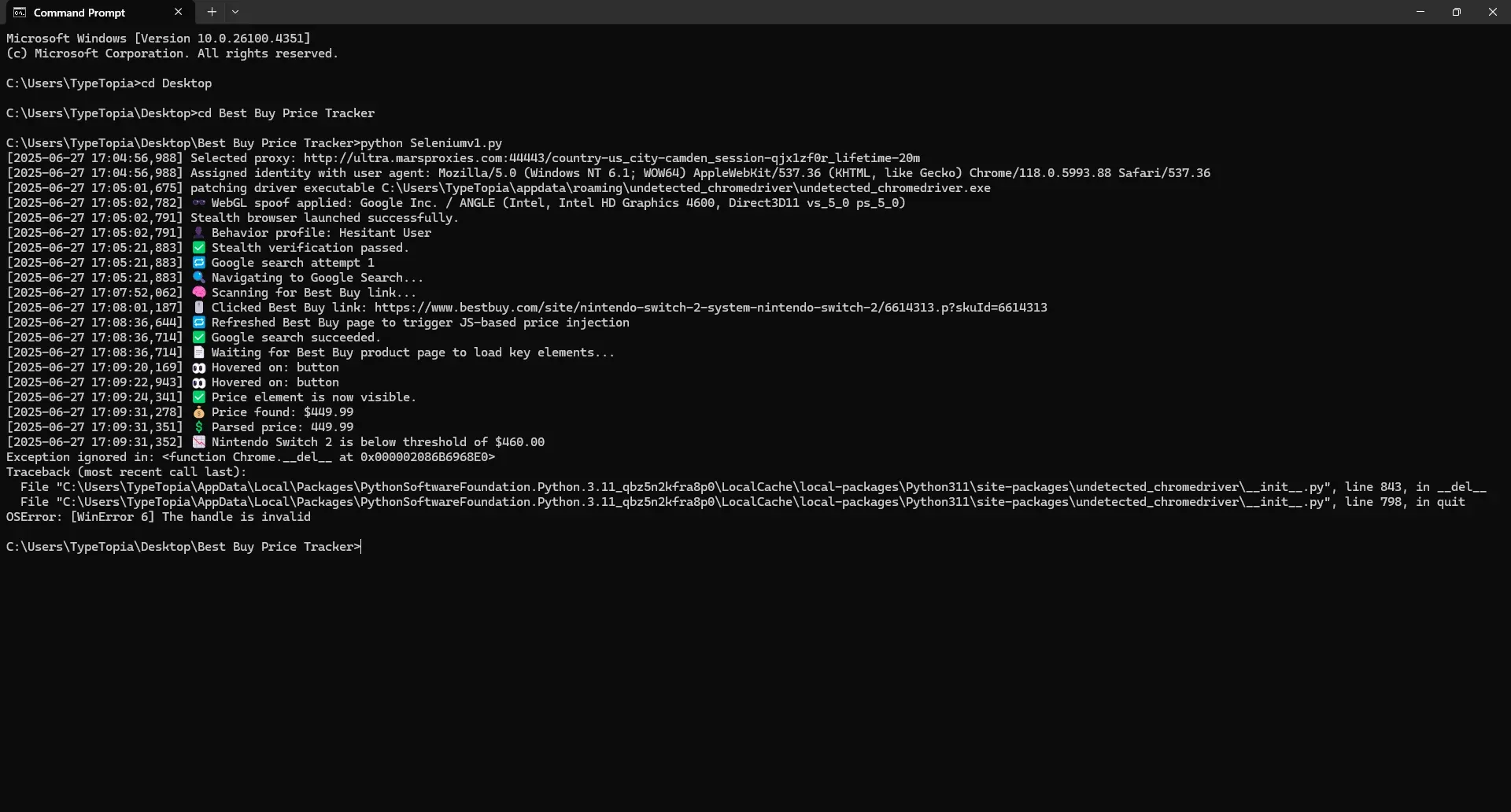
该脚本成功启动隐身浏览器,隐藏设备身份特征,并通过 MarsProxies 的轮换代理路由请求,模拟真实用户在 Google 上搜索“Nintendo Switch 2 Best Buy”的行为。
找到正确的 Best Buy 产品页面链接后,脚本点击进入该页面,等待页面完全加载,并像真人一样通过滚动、悬停、停顿等方式浏览界面,然后再查看价格。
进入 Best Buy 产品页面后,脚本耐心等待关键元素加载完成,提取出价格:449.99 美元。由于该价格低于我们设置的 460.00 美元阈值,脚本触发了提醒,将结果记录到 CSV 文件中,并发送邮件通知提示可以购买了。
流程结束时出现了一条无害的关闭警告,提示存在无效句柄。这是 undetected_chromedriver 在 Windows 系统上的已知小问题,可以放心忽略。浏览器仍正常退出,脚本也顺利完成了整个流程。
使用代理进行价格追踪的优势
在抓取任何价格数据之前,我们已经写了大量代码,这并非偶然。数据抓取本身并不难,真正的难点在于如何在不被识别的情况下访问页面,这正是代理不可或缺的原因。
代理的作用如下:
- 在数据抓取过程中隐藏您的真实 IP
- 支持从不同城市和州进行测试
- 循环运行会话时避免触发速率限制
- 为扩展数据采集规模提供空间
- 借助 MarsProxies 提供的住宅代理、移动代理或数据中心代理,打造稳定的隐身方案
代理只是入场券,但仅有代理还不够。您仍需修改浏览器指纹特征,像真人一样放慢操作节奏,并愿意耐心等待,这才是让整个流程真正奏效的关键。
结语
如果您需要一款能够在真实场景中稳定运行的价格追踪工具,这正是您需要的。您可以借助 Task Scheduler 或 cron job 实现每日自动运行,该脚本灵活、可修改,且经得起长期使用。如果您想了解更多进阶技巧,或希望分享使用心得,欢迎访问我们的Discord 社区。此外,别忘了了解我们的Nvidia 代理。
祝追踪顺利!
2026 年稳定追踪 Best Buy 价格,告别封禁
获取住宅代理